

proxy/openai model provider targets any OpenAI-compatible endpoint, so it runs on the ScitiX Model Inference API.
Default model here is glm-5.2; see the Models page for the full list and pricing.
Deploy DB-GPT per the official guide — the lightweight dbgpt-openai image is the proxy-only build (no local GPU model) and is the right base for ScitiX.
Configure
Models in DB-GPT are defined server-side in a TOML config, not in the UI. Use theproxy/openai provider and the shipped configs/dbgpt-proxy-openai.toml config. This is the path for OpenAI-compatible endpoints like ScitiX, and the proxy-only dbgpt-openai build needs no local GPU model.
The config already reads every value from the environment, so point it at ScitiX by setting these variables. Start the server with --config configs/dbgpt-proxy-openai.toml.
Verify
Start the web server and open the UI (defaulthttp://localhost:5670). In a chat, the model selector shows glm-5.2 — send a message and a normal reply confirms the connection.
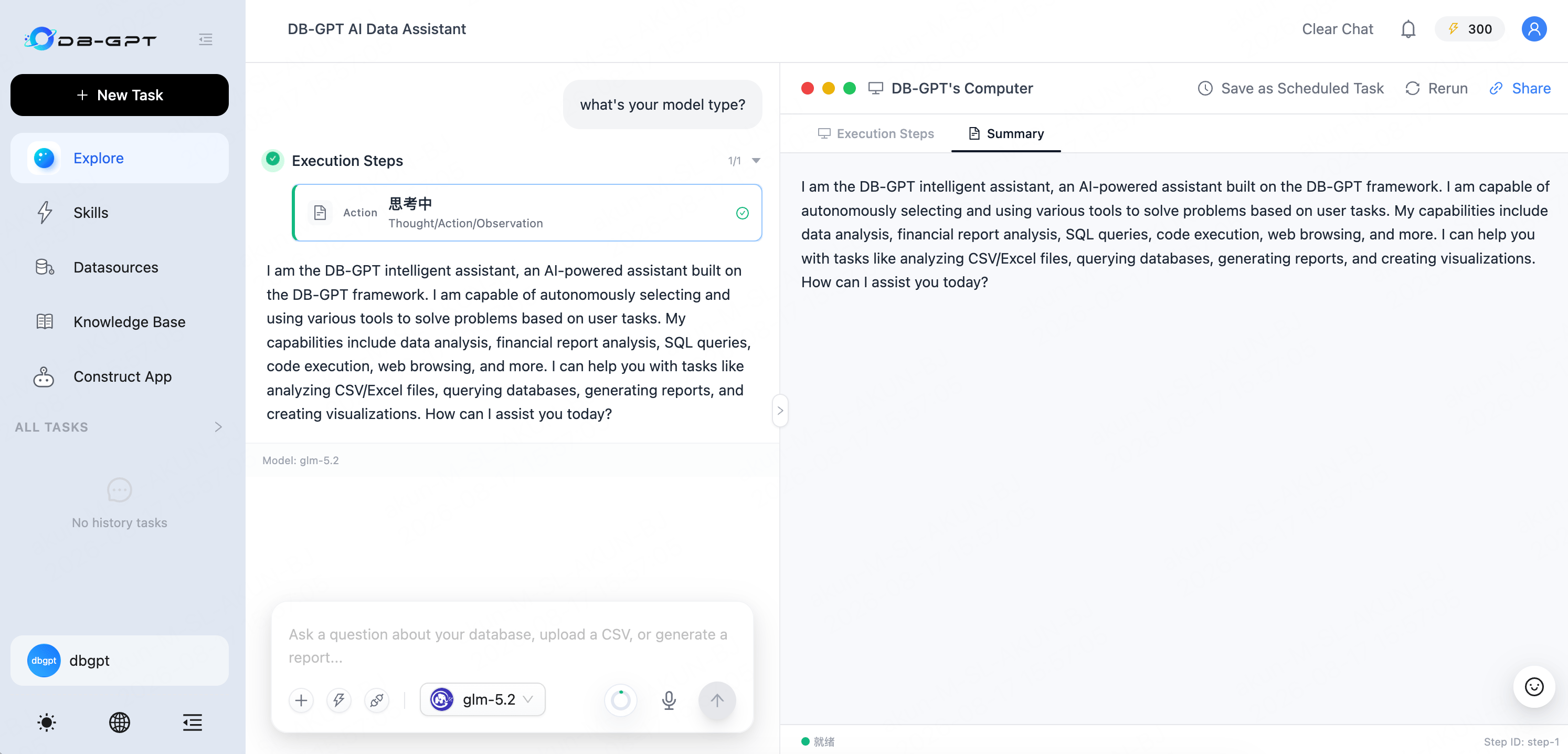
Model: glm-5.2 label under the message confirms the ScitiX model in use.
Verified on DB-GPT v0.8.1.