

What is ephemeral storage
In Kubernetes, Pod ephemeral storage is node-local space for data generated while a Pod runs, including files written under paths such as/tmp, /root, and /usr. Its lifecycle follows the Pod: when the Pod is deleted, recreated, moved, or evicted, its associated ephemeral storage is released.
Data written to ephemeral storage is not persistent. Do not keep datasets, experiment results, checkpoints, model files, business logs, or long-lived caches solely on local container paths if you need them after the workload ends.
Common sources of ephemeral storage usage include:
Ephemeral storage limits can vary by cluster, instance specification, and workload type. Check the usage, quota, utilization, and status displayed on the workload details page to assess the available space for your workload.
Check current usage
Development environments, training jobs, LLM inference services, and general services all show Pod ephemeral storage on their details pages. Open the Storage tab for the relevant object and check the amount used, quota, utilization, and status. For example, the training job details page shows storage information: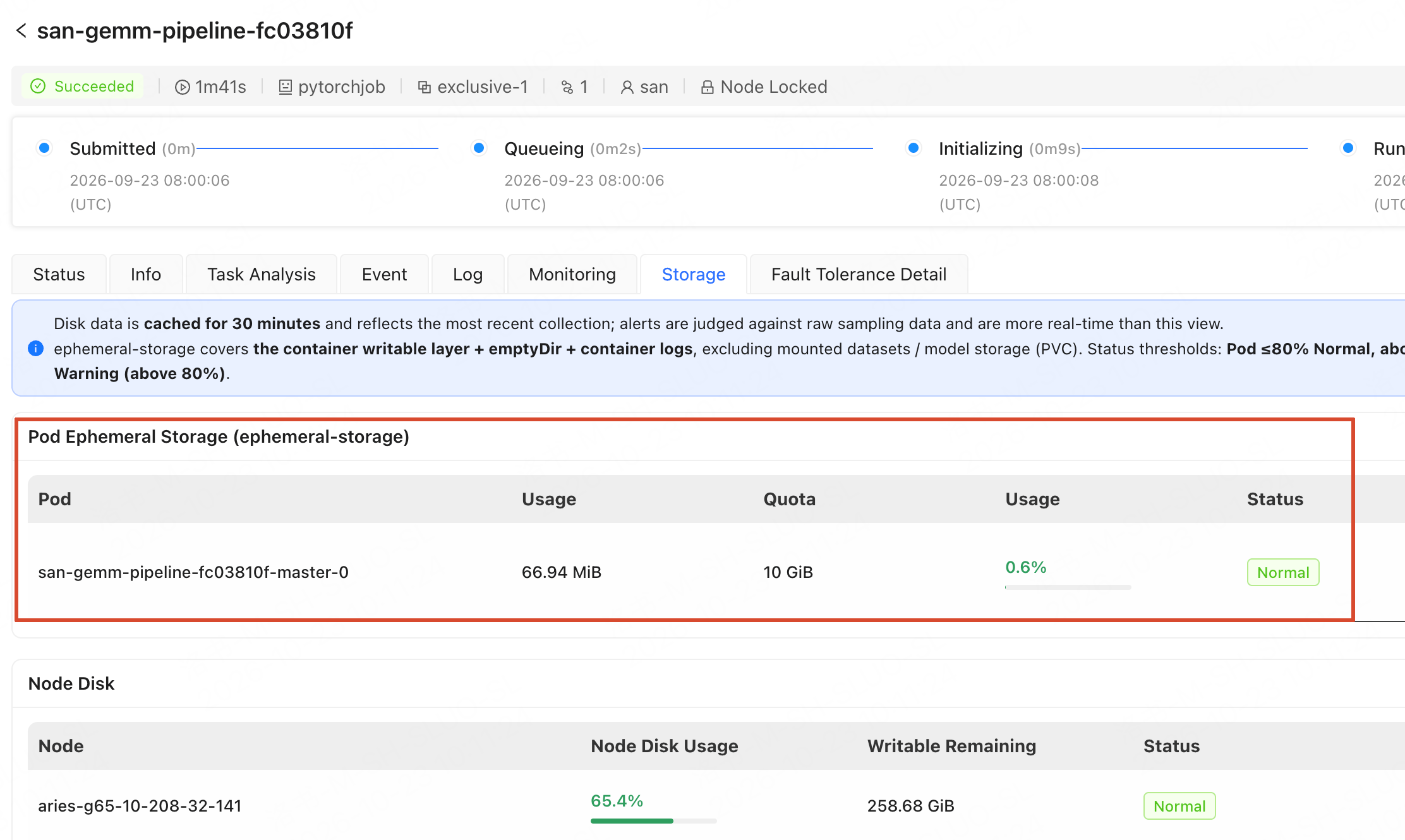
Configure disk alerts
For long-running training jobs, development environments, or services, configure disk alerts so that you receive notifications when Pod ephemeral storage or node disk usage rises.- Under Alarm > Notification Management, prepare a notification target or contact group and make sure it is enabled. See Manage Alert Notification Targets. Without an enabled notification recipient, the platform cannot deliver a triggered alert.
-
Under Alarm > Alarm Subscription, create a subscription. See Create an Alarm Subscription.
When creating the subscription, expand the Volume category. To receive both critical and warning alerts for Pod ephemeral storage and node disk utilization, select these alert items:
pod_disk_watermark-criticalpod_disk_watermark-warningnode_disk_watermark-criticalnode_disk_watermark-warning
Clean up high-usage paths
If the console shows high ephemeral storage usage, first stop writing more data to local paths. Decide which data to keep and move it to a mounted Volume. Delete only data that you have confirmed can be discarded. Common paths to inspect include:
If the Pod has already been evicted, data in ephemeral storage may no longer be recoverable. Before rerunning the workload, change its write paths to avoid the same problem.
Write caches and outputs to a Volume
To avoid filling ephemeral storage, direct growing data and data you need to retain or reuse to a mounted Volume instead of a local container directory. Examples include dependency and model caches, training checkpoints, job outputs, business logs, and large downloads. Mount paths typically look like/volume/<resource-pool>. Set cache directories explicitly in a startup command, job script, or ~/.bashrc. Replace the example path components with your actual mounted path and workspace directory before running these commands:
For example:
$HOME by default, first check whether it supports an environment variable for changing the directory.
For example, Claude Code normally writes configuration and caches under $HOME. To direct future writes to a mounted Volume, set CLAUDE_CONFIG_DIR:
- Use absolute paths, not relative paths.
- Set environment variables before starting the tool, for example in
~/.bashrcor the startup command. Putting a path only in the tool’s configuration file usually does not redirect its writes. - Restart the tool or process after changing the variables.
- Claude Code does not support
--config-dirfor changing its configuration directory; useCLAUDE_CONFIG_DIR. - Environment variables generally affect only future writes. They do not automatically move existing files, the program itself, project files, or other tools’ caches.
Check whether full ephemeral storage caused eviction
If a training job fails, a development environment stops, or a service instance becomes unhealthy, check Event on its details page. Eviction, disk pressure, or insufficient ephemeral storage events may indicate a Pod storage or node disk issue. Check the following information together:
After confirming that ephemeral storage is involved, change the write path or remove disposable data before restarting the development environment, resubmitting the training job, or redeploying the service.
FAQ
Why does disk space reported in the container differ from the console?
Why does disk space reported in the container differ from the console?
Running
df -h / in a container usually reports disk space from the node’s or container’s perspective, not the current Pod’s ephemeral storage quota. To determine whether a Pod is near its limit, check usage, quota, and status for Pod Ephemeral Storage on the console’s Storage tab.Which files should I clean up first?
Which files should I clean up first?
Use paths, timestamps, and console usage trends to prioritize cleanup. New files under
/tmp, /root, /usr, or $HOME may raise ephemeral storage usage; image-bundled files are usually lower priority. Before deleting a file, check whether a process still uses it or it needs moving to a Volume.Can I recover data after ephemeral storage fills up?
Can I recover data after ephemeral storage fills up?
Not always. Eviction, recreation, or migration may release a Pod’s ephemeral storage. Write code, datasets, checkpoints, models, experiment results, caches, and long-lived logs to a Volume while it runs if you need to retain, reuse, or grow them. Do not wait for a Pod failure to try to recover them.