

Configure
1. Install OpenClaw
Check your Node version first:2. Complete onboarding
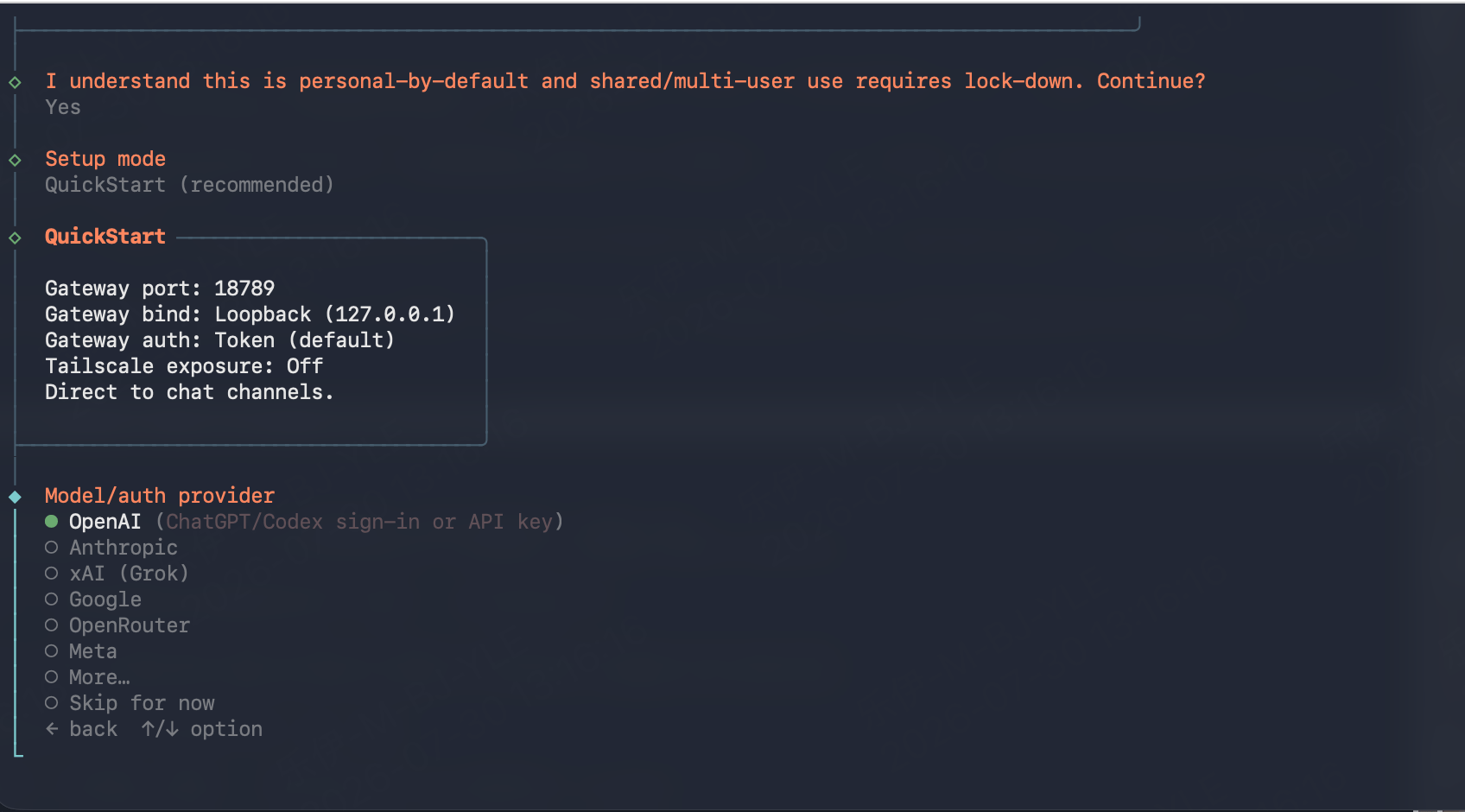
openclaw onboard walks you through an interactive setup wizard. Answer the prompts as follows:
- “I understand this is personal-by-default…”: select Yes.
-
Setup mode: select QuickStart (recommended). The defaults it applies, including Gateway port
18789, loopback bind, token auth, and Tailscale off, are fine for connecting to ScitiX. -
Model/auth provider: select Skip for now.
The providers listed here, such as OpenAI, Anthropic, and Google, are sign-in flows for those companies’ official services. Picking OpenAI would point OpenClaw at
api.openai.com, not at ScitiX. ScitiX is added as a custom provider in the config file.
- Default model: select Keep current. Do not enter the ScitiX model here because the provider has no credentials yet. The config file below sets
agents.defaults.model.primaryto the ScitiX model. - Everything after that, such as Web search and Chat channels: select Skip for now. These agent extras are independent of the model provider and can be configured later with
openclaw configure.
/exit; Ctrl+C does not quit the TUI.
3. Configure the provider
First, create an API Key on the API Keys page, then store it where the gateway can read it. The gateway runs as a daemon, so a shellexport will not reach it. Use OpenClaw’s env file instead:
~/.openclaw/openclaw.json to add ScitiX as a custom provider and set it as the default model. The wizard has already written gateway and agent settings to this file. Merge these keys in; do not replace the file.
OpenClaw’s agent features rely on the model’s native tool calling. Use a model that supports it.
Instead of editing
agents.defaults.model.primary by hand, you can also run:
api to anthropic-messages and baseUrl to https://api.scitix.ai/model-api.
The gateway watches ~/.openclaw/openclaw.json and hot-applies model and agent changes automatically. If a change does not seem to take effect, force it with:
In containers or other environments without systemd user services,
openclaw gateway restart reports “Gateway service disabled”. The chat TUI (openclaw) and openclaw agent --local still run the agent embedded, reading the same config with no gateway involved. If you want the gateway for the dashboard or messaging channels, run it in the foreground with openclaw gateway in a separate terminal.Verify
agent command expects the message in -m / --message, not as a positional argument. A session selector such as --agent main is required.
You can also start the chat TUI with openclaw chat, which is an alias of tui --local, send a message, and confirm that you get a normal response.
If you are running the daemonized gateway, also check:
openclaw dashboard, served at http://127.0.0.1:18789/.
FAQ
- Unknown model: scitix/glm-5.2 … no matching models.providers[…] entry: the default model is registered but the provider block is missing, or the config edit did not reach the gateway. Check that
models.providers.scitixexists in~/.openclaw/openclaw.jsonand restart the gateway. - If authentication fails, check that
~/.openclaw/.envcontains the key without quotes or stray whitespace, and restart the gateway after any config change.