

Create Workflow
1. Go to the creation page
- Go to Training > Workflows.
-
Click Create and select Create with Form or Create with Code.
- Form Creation: Suitable for dragging nodes, configuring dependencies, and entering node parameters one by one in the console.
- Code Creation: Suitable for scenarios where you already have a DAG configuration, need to reuse templates, or want to maintain workflow definitions uniformly through JSON/YAML.
2. Enter Basic information
3. Configure DAG
- Create by Form
- Create with Code
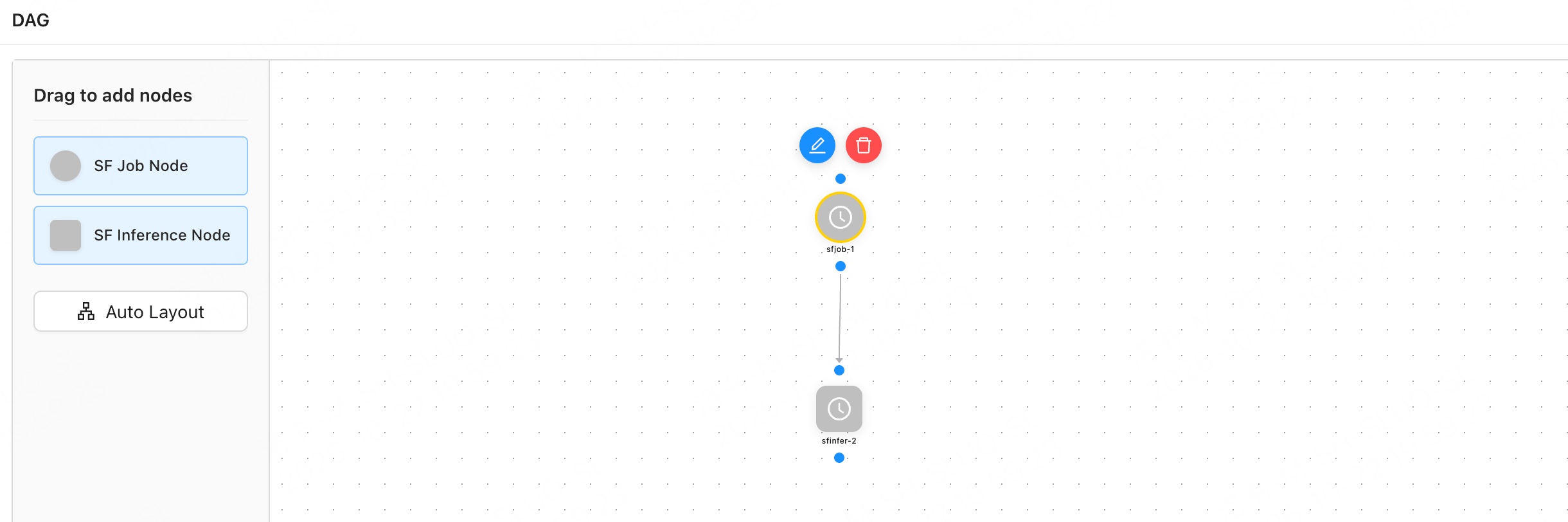
- In the DAG area, drag nodes from the node list on the left to the canvas. SF Job Node and SF Inference Node are currently supported.
- Connect the nodes in workflow order, or click Auto Layout to arrange the canvas.
- Click the node’s edit button to open Node Configuration.
- Configure upstream dependencies on the Predecessor Node Dependencies tab.
-
Configure the basic node information on the Common Fields tab.
-
On the Load Parameters tab, configure the job or inference workload parameters to be run by the node.
- SF Job Node: Configurations for the image, resources, Volume, dataset, model, startup command, and more are generally consistent with those for Training. For details, see Create a Training Task.
- SF Inference Node: Configurations for the resource pool, inference engine, model, cache, service, and monitoring are generally consistent with those for creating an LLM inference service. For details, see Create an LLM Inference Service.
- Click Save.
- Verify that the nodes and dependencies on the canvas meet expectations.
4. Submit Creation
Click Create to submit the workflow. After submission, view the workflow status in the Workflows list or details. When creating a Workflow, focus on verifying that node dependencies and execution conditions meet the expected workflow requirements. The node configuration must also meet the configuration requirements for the corresponding Training or Inference service.View and manage workflows
After navigating to Training > Workflows, you can find workflows using the filters provided on the page. When viewing a workflow, focus on:- The current workflow status and execution progress.
- Which nodes are running, have failed, or are waiting for upstream nodes.
- Whether a node failure is caused by task configuration, resource scheduling, an image, mounting, a command, or upstream dependencies.
- Whether the workflow needs to be rerun or a specific training job needs to be investigated separately.