Account Information
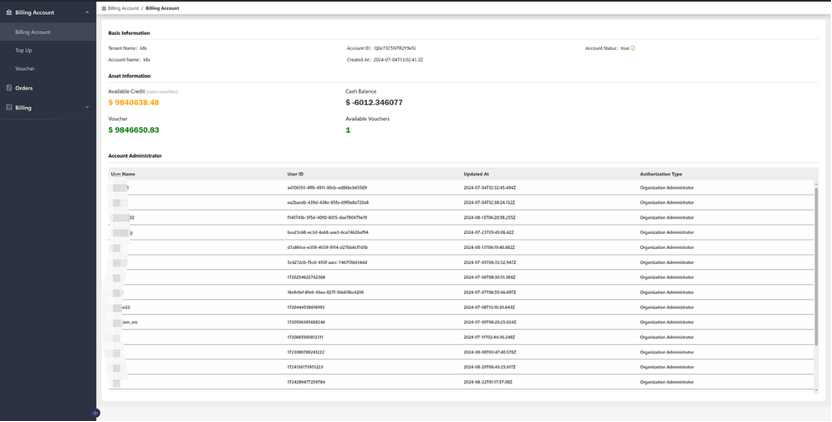
On the billing account page, you can view the following information about account and asset:-
Basic Information:
- Tenant Name: The name assigned to the tenant using the service.
- Account ID: A unique identifier for the account, used for tracking and managing the specific account within the system.
- Account Status: Indicates the current status of the account, such as “True”, to signify that the account is operational.
- Account Name: The designated name for the account, which may align with the tenant name or serve as an internal reference.
- Created At: The date and time when the account was created.
-
Asset Information
- Available Credit: The total credit available in the account, encompassing both vouchers and cash balances.
- Cash Balance: The amount of money added to the account through recharge methods, including offline payments. This represents actual currency.
- Voucher: A flexible tool for business expansion, which may have specific validity periods and applicable product categories.
- Available Vouchers: The number of vouchers currently available for use in the account.
-
Account Administrator
The Account Administrator section provides details including user’s name, unique user ID, the date and time of the last update, and their level of access, such as “Organization Administrator.”