> ## Documentation Index
> Fetch the complete documentation index at: https://docs.scitix.ai/llms.txt
> Use this file to discover all available pages before exploring further.
# OpenClaw
[OpenClaw](https://github.com/openclaw/openclaw) is an open-source personal AI assistant that connects to messaging channels such as WhatsApp, Telegram, and Feishu/Lark, and acts on your behalf through an agent loop. It supports custom OpenAI-compatible providers, so you can point it to the ScitiX Model Inference API.
OpenClaw requires **Node.js 22.22.3+, 24.15+, or 25.9+**. A newer LTS version is recommended. Installing with an unsupported Node version may silently pull an older placeholder release.
## Configure
### 1. Install OpenClaw
Check your Node version first:
```bash theme={null}
node -v
```
If it is below the requirement, upgrade Node. The [official download page](https://nodejs.org/en/download) covers every platform and method.
```bash macOS (Homebrew) theme={null}
brew install node@24
```
```bash Windows (winget) theme={null}
winget install OpenJS.NodeJS.LTS
```
```bash Linux/macOS (nvm) theme={null}
nvm install 24 && nvm use 24
nvm alias default 24
```
With nvm, set a default alias. Without it, new terminals may fall back to the old Node version and npm-installed commands can disappear from `PATH`.
Install OpenClaw:
```bash theme={null}
npm install -g openclaw@latest
openclaw onboard --install-daemon
```
### 2. Complete onboarding
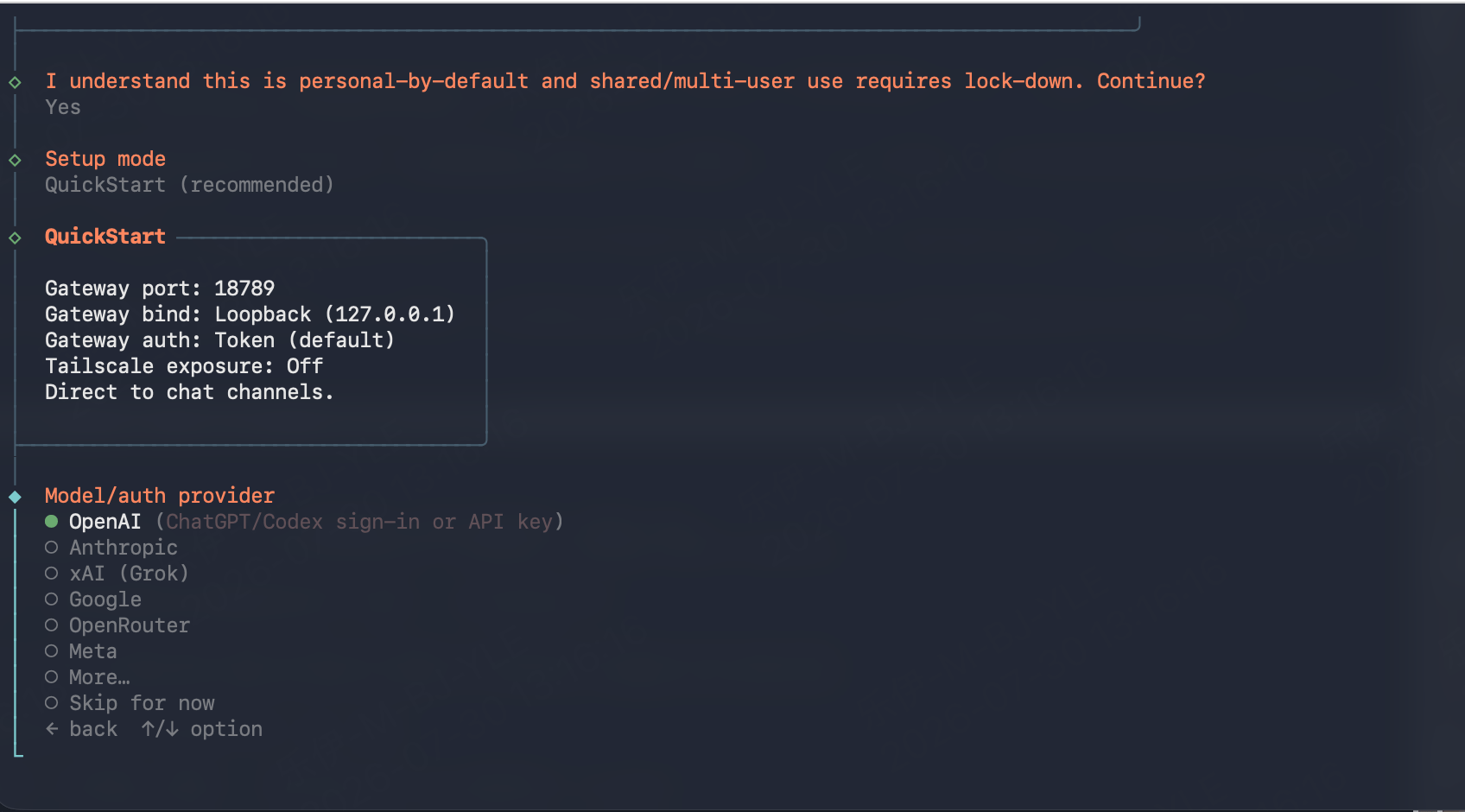
`openclaw onboard` walks you through an interactive setup wizard. Answer the prompts as follows:
1. **"I understand this is personal-by-default..."**: select **Yes**.
2. **Setup mode**: select **QuickStart (recommended)**. The defaults it applies, including Gateway port `18789`, loopback bind, token auth, and Tailscale off, are fine for connecting to ScitiX.
3. **Model/auth provider**: select **Skip for now**.
The providers listed here, such as OpenAI, Anthropic, and Google, are sign-in flows for those companies' official services. Picking OpenAI would point OpenClaw at `api.openai.com`, not at ScitiX. ScitiX is added as a custom provider in the config file.
 4. **Default model**: select **Keep current**. Do not enter the ScitiX model here because the provider has no credentials yet. The config file below sets `agents.defaults.model.primary` to the ScitiX model.
5. **Everything after that**, such as Web search and Chat channels: select **Skip for now**. These agent extras are independent of the model provider and can be configured later with `openclaw configure`.
When the wizard finishes, it opens the OpenClaw chat TUI. Messages will fail with a model error until the provider is configured. That is expected. Exit by typing `/exit`; `Ctrl+C` does not quit the TUI.
### 3. Configure the provider
First, create an API Key on the [API Keys](https://console.scitix.ai/model-inference/api_keys) page, then store it where the gateway can read it. The gateway runs as a daemon, so a shell `export` will not reach it. Use OpenClaw's env file instead:
```bash theme={null}
echo 'SCITIX_API_KEY=' >> ~/.openclaw/.env
```
Then edit `~/.openclaw/openclaw.json` to add ScitiX as a custom provider and set it as the default model. The wizard has already written gateway and agent settings to this file. Merge these keys in; do not replace the file.
```json theme={null}
{
"models": {
"providers": {
"scitix": {
"baseUrl": "https://api.scitix.ai/model-api/v1",
"apiKey": "${SCITIX_API_KEY}",
"api": "openai-completions",
"models": [
{
"id": "glm-5.2",
"name": "ScitiX glm-5.2",
"contextWindow": 128000,
"maxTokens": 8192
}
]
}
}
},
"agents": {
"defaults": {
"model": { "primary": "scitix/glm-5.2" }
}
}
}
```
| Field | Description |
| ------------------------------- | ------------------------------------------------------------------------------------------------------------------------------------------------- |
| `baseUrl` | ScitiX OpenAI-compatible endpoint: `https://api.scitix.ai/model-api/v1`. |
| `apiKey` | `${VAR}` interpolation reads from `~/.openclaw/.env`, a `.env` in the working directory, or the environment. You can also paste the key directly. |
| `api` | Wire protocol. Use `openai-completions`. |
| `contextWindow` / `maxTokens` | Set to match the chosen model's actual limits. |
| `agents.defaults.model.primary` | Default model in `/` form. |
Set `contextWindow` and `maxTokens` to the actual limits of your chosen model. Values that are too large will be rejected by the platform.
OpenClaw's agent features rely on the model's native tool calling. Use a model that supports it.
Instead of editing `agents.defaults.model.primary` by hand, you can also run:
```bash theme={null}
openclaw models set scitix/glm-5.2
openclaw models list
```
If you would rather use the Anthropic-compatible endpoint, set `api` to `anthropic-messages` and `baseUrl` to `https://api.scitix.ai/model-api`.
The gateway watches `~/.openclaw/openclaw.json` and hot-applies model and agent changes automatically. If a change does not seem to take effect, force it with:
```bash theme={null}
openclaw gateway restart
```
In containers or other environments without systemd user services, `openclaw gateway restart` reports **"Gateway service disabled"**. The chat TUI (`openclaw`) and `openclaw agent --local` still run the agent embedded, reading the same config with no gateway involved. If you want the gateway for the dashboard or messaging channels, run it in the foreground with `openclaw gateway` in a separate terminal.
## Verify
```bash theme={null}
openclaw models list # expect scitix/glm-5.2 with the "default,configured" tags
# one-shot task, runs the agent embedded — no gateway required
openclaw agent --agent main -m "introduce yourself in one sentence" --local
```
The `agent` command expects the message in `-m` / `--message`, not as a positional argument. A session selector such as `--agent main` is required.
You can also start the chat TUI with `openclaw chat`, which is an alias of `tui --local`, send a message, and confirm that you get a normal response.
If you are running the daemonized gateway, also check:
```bash theme={null}
openclaw gateway status # expect: running on port 18789
```
You can then use a connected channel or the dashboard with `openclaw dashboard`, served at `http://127.0.0.1:18789/`.
## FAQ
* **Unknown model: scitix/glm-5.2 ... no matching models.providers\[...] entry**: the default model is registered but the provider block is missing, or the config edit did not reach the gateway. Check that `models.providers.scitix` exists in `~/.openclaw/openclaw.json` and restart the gateway.
* If authentication fails, check that `~/.openclaw/.env` contains the key without quotes or stray whitespace, and restart the gateway after any config change.
4. **Default model**: select **Keep current**. Do not enter the ScitiX model here because the provider has no credentials yet. The config file below sets `agents.defaults.model.primary` to the ScitiX model.
5. **Everything after that**, such as Web search and Chat channels: select **Skip for now**. These agent extras are independent of the model provider and can be configured later with `openclaw configure`.
When the wizard finishes, it opens the OpenClaw chat TUI. Messages will fail with a model error until the provider is configured. That is expected. Exit by typing `/exit`; `Ctrl+C` does not quit the TUI.
### 3. Configure the provider
First, create an API Key on the [API Keys](https://console.scitix.ai/model-inference/api_keys) page, then store it where the gateway can read it. The gateway runs as a daemon, so a shell `export` will not reach it. Use OpenClaw's env file instead:
```bash theme={null}
echo 'SCITIX_API_KEY=' >> ~/.openclaw/.env
```
Then edit `~/.openclaw/openclaw.json` to add ScitiX as a custom provider and set it as the default model. The wizard has already written gateway and agent settings to this file. Merge these keys in; do not replace the file.
```json theme={null}
{
"models": {
"providers": {
"scitix": {
"baseUrl": "https://api.scitix.ai/model-api/v1",
"apiKey": "${SCITIX_API_KEY}",
"api": "openai-completions",
"models": [
{
"id": "glm-5.2",
"name": "ScitiX glm-5.2",
"contextWindow": 128000,
"maxTokens": 8192
}
]
}
}
},
"agents": {
"defaults": {
"model": { "primary": "scitix/glm-5.2" }
}
}
}
```
| Field | Description |
| ------------------------------- | ------------------------------------------------------------------------------------------------------------------------------------------------- |
| `baseUrl` | ScitiX OpenAI-compatible endpoint: `https://api.scitix.ai/model-api/v1`. |
| `apiKey` | `${VAR}` interpolation reads from `~/.openclaw/.env`, a `.env` in the working directory, or the environment. You can also paste the key directly. |
| `api` | Wire protocol. Use `openai-completions`. |
| `contextWindow` / `maxTokens` | Set to match the chosen model's actual limits. |
| `agents.defaults.model.primary` | Default model in `/` form. |
Set `contextWindow` and `maxTokens` to the actual limits of your chosen model. Values that are too large will be rejected by the platform.
OpenClaw's agent features rely on the model's native tool calling. Use a model that supports it.
Instead of editing `agents.defaults.model.primary` by hand, you can also run:
```bash theme={null}
openclaw models set scitix/glm-5.2
openclaw models list
```
If you would rather use the Anthropic-compatible endpoint, set `api` to `anthropic-messages` and `baseUrl` to `https://api.scitix.ai/model-api`.
The gateway watches `~/.openclaw/openclaw.json` and hot-applies model and agent changes automatically. If a change does not seem to take effect, force it with:
```bash theme={null}
openclaw gateway restart
```
In containers or other environments without systemd user services, `openclaw gateway restart` reports **"Gateway service disabled"**. The chat TUI (`openclaw`) and `openclaw agent --local` still run the agent embedded, reading the same config with no gateway involved. If you want the gateway for the dashboard or messaging channels, run it in the foreground with `openclaw gateway` in a separate terminal.
## Verify
```bash theme={null}
openclaw models list # expect scitix/glm-5.2 with the "default,configured" tags
# one-shot task, runs the agent embedded — no gateway required
openclaw agent --agent main -m "introduce yourself in one sentence" --local
```
The `agent` command expects the message in `-m` / `--message`, not as a positional argument. A session selector such as `--agent main` is required.
You can also start the chat TUI with `openclaw chat`, which is an alias of `tui --local`, send a message, and confirm that you get a normal response.
If you are running the daemonized gateway, also check:
```bash theme={null}
openclaw gateway status # expect: running on port 18789
```
You can then use a connected channel or the dashboard with `openclaw dashboard`, served at `http://127.0.0.1:18789/`.
## FAQ
* **Unknown model: scitix/glm-5.2 ... no matching models.providers\[...] entry**: the default model is registered but the provider block is missing, or the config edit did not reach the gateway. Check that `models.providers.scitix` exists in `~/.openclaw/openclaw.json` and restart the gateway.
* If authentication fails, check that `~/.openclaw/.env` contains the key without quotes or stray whitespace, and restart the gateway after any config change.