> ## Documentation Index
> Fetch the complete documentation index at: https://docs.scitix.ai/llms.txt
> Use this file to discover all available pages before exploring further.
# n8n
> Learn how to configure n8n credentials and AI Agent nodes with ScitiX Model Inference for automated LLM workflows.
[n8n](https://n8n.io) is a leading workflow automation platform with built-in [AI capabilities](https://docs.n8n.io/build/integrate-ai/) — AI Agent nodes, LLM chains, and RAG components. Its **OpenAI credential supports a custom Base URL**, so every OpenAI-flavored AI node can run on the ScitiX Model Inference API (same steps on n8n Cloud and self-hosted). See the [Models](https://console.scitix.ai/model-inference/models) page for available models (e.g. `glm-5.2`).
## 1. Create the credential
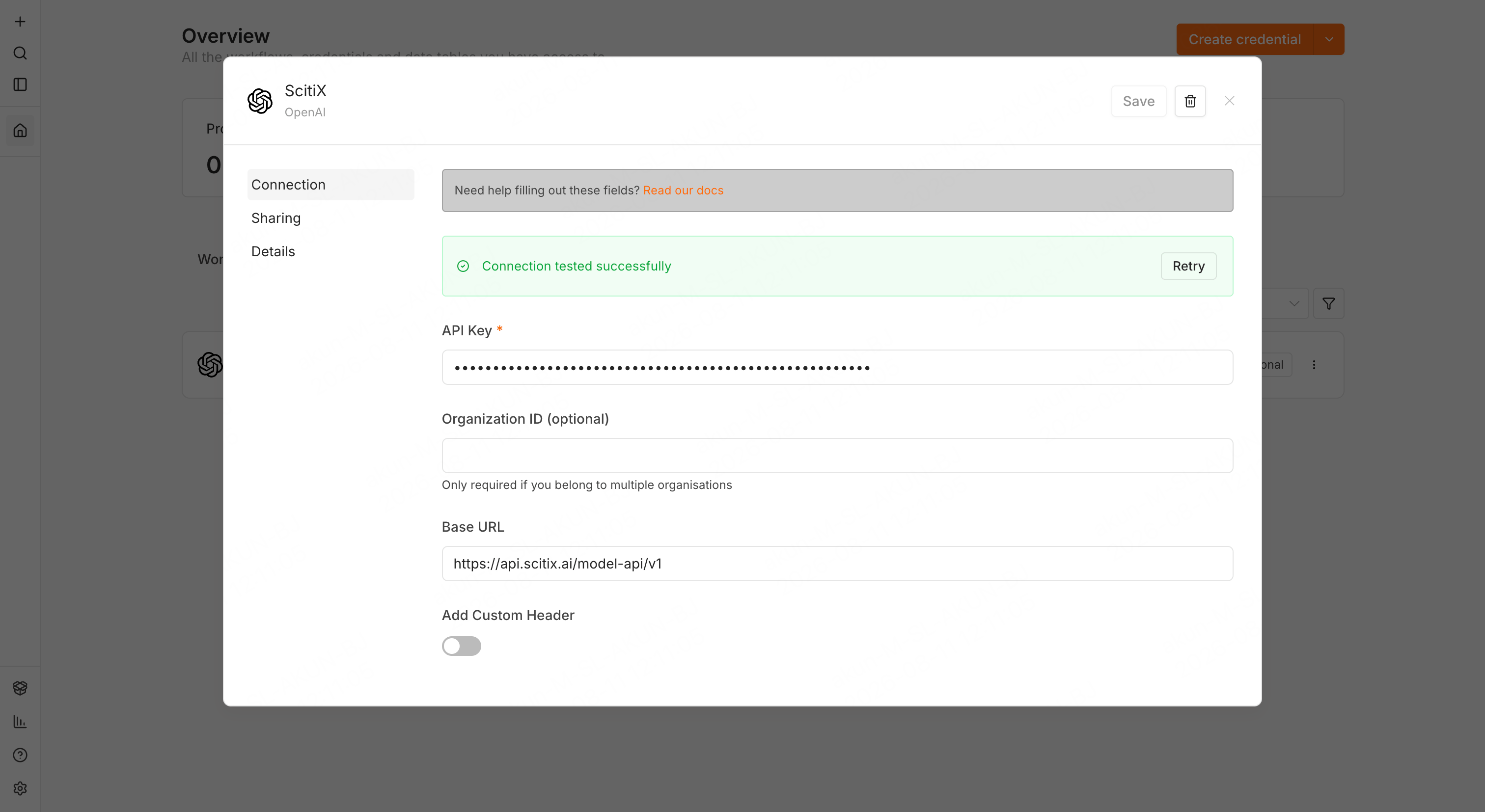
Create an API key on the ScitiX [API Keys](https://console.scitix.ai/model-inference/api_keys) page. Then in n8n, open the **Credentials** tab, click **Create credential**, and pick **OpenAI** in the app selector. Fill in:
| Field | Value |
| --------------- | ------------------------------------ |
| API Key | Your ScitiX API key |
| Organization ID | Leave blank |
| Base URL | `https://api.scitix.ai/model-api/v1` |
When you save, n8n tests the credential with a `GET /models` call against the Base URL — **Connection tested successfully** means ScitiX is reachable and the key works.
 ## 2. Use it in a workflow
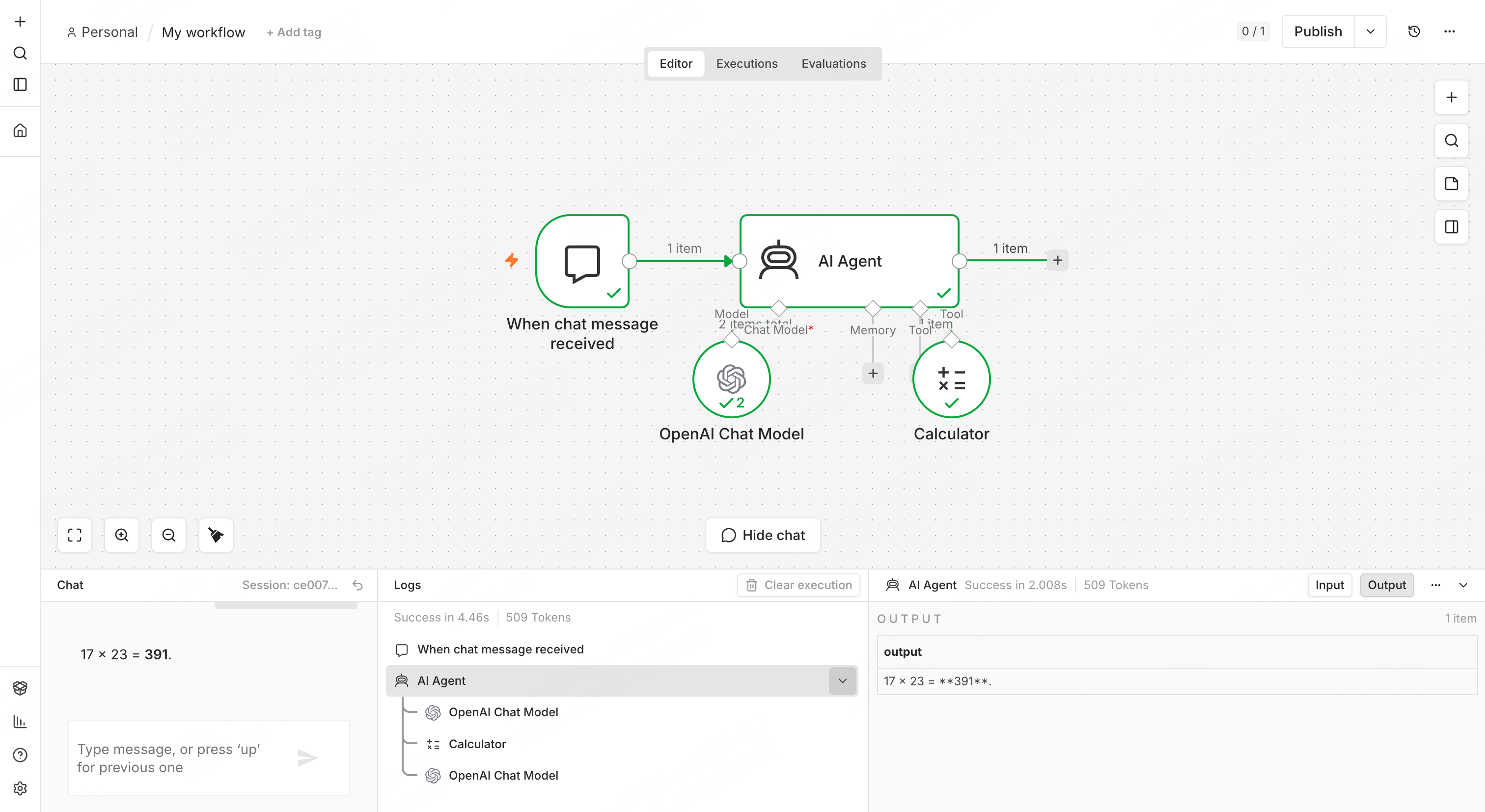
1. Create a workflow with a **Chat Trigger** ("On chat message") and an **AI Agent** node.
2. Open the AI Agent node, click **+ Chat Model**, and pick **OpenAI Chat Model**.
3. In the OpenAI Chat Model node, select the ScitiX credential (on n8n Cloud, choose **My own credential** first). The **Model** dropdown loads live from ScitiX's `/models` endpoint — select `glm-5.2`. The AI Agent node runs as a Tools Agent since n8n 1.82.0, so the model must support native tool calling; `glm-5.2` does. Check the platform's tool-calling list before switching models.
4. Leave **Use Responses API** off — that toggle targets OpenAI's own API.
5. Connect at least one tool sub-node to the AI Agent (a documented requirement — e.g. the Calculator tool).
The credential is shared by the **OpenAI Chat Model**, **Embeddings OpenAI**, and plain **OpenAI** nodes. For ScitiX, prefer the Chat Model sub-node: many plain-OpenAI-node operations (image, audio, files) call OpenAI-specific endpoints.
For embeddings-based workflows (RAG), add an **Embeddings OpenAI** node on the same credential and pick an embedding model from the [Models](https://console.scitix.ai/model-inference/models) page.
## Verify
Open the chat panel and send a message that exercises the tool, for example "what is 17 \* 23?". A streamed answer with a visible tool call and the result `391` confirms both the connection and tool calling. For a plain completion test without tools, use a Basic LLM Chain root node with the same OpenAI Chat Model sub-node.
## 2. Use it in a workflow
1. Create a workflow with a **Chat Trigger** ("On chat message") and an **AI Agent** node.
2. Open the AI Agent node, click **+ Chat Model**, and pick **OpenAI Chat Model**.
3. In the OpenAI Chat Model node, select the ScitiX credential (on n8n Cloud, choose **My own credential** first). The **Model** dropdown loads live from ScitiX's `/models` endpoint — select `glm-5.2`. The AI Agent node runs as a Tools Agent since n8n 1.82.0, so the model must support native tool calling; `glm-5.2` does. Check the platform's tool-calling list before switching models.
4. Leave **Use Responses API** off — that toggle targets OpenAI's own API.
5. Connect at least one tool sub-node to the AI Agent (a documented requirement — e.g. the Calculator tool).
The credential is shared by the **OpenAI Chat Model**, **Embeddings OpenAI**, and plain **OpenAI** nodes. For ScitiX, prefer the Chat Model sub-node: many plain-OpenAI-node operations (image, audio, files) call OpenAI-specific endpoints.
For embeddings-based workflows (RAG), add an **Embeddings OpenAI** node on the same credential and pick an embedding model from the [Models](https://console.scitix.ai/model-inference/models) page.
## Verify
Open the chat panel and send a message that exercises the tool, for example "what is 17 \* 23?". A streamed answer with a visible tool call and the result `391` confirms both the connection and tool calling. For a plain completion test without tools, use a Basic LLM Chain root node with the same OpenAI Chat Model sub-node.
 ## FAQ
* **The Model dropdown is empty**: The `GET /models` call failed. Re-check the Base URL (`/v1` suffix, no trailing slash) and the key.
* **Which tool should I use for a quick test?** Prefer the Calculator tool. If you use a **Code** tool instead, each parameter must be individually enabled for the AI to fill (click the ✨ on it, or you get `No parameters are set up to be filled by AI`), and the Code node runs on a separate task runner that times out at 60s if that runner isn't enabled. Calculator avoids both.
Verified on self-hosted n8n 2.32.7.
## FAQ
* **The Model dropdown is empty**: The `GET /models` call failed. Re-check the Base URL (`/v1` suffix, no trailing slash) and the key.
* **Which tool should I use for a quick test?** Prefer the Calculator tool. If you use a **Code** tool instead, each parameter must be individually enabled for the AI to fill (click the ✨ on it, or you get `No parameters are set up to be filled by AI`), and the Code node runs on a separate task runner that times out at 60s if that runner isn't enabled. Calculator avoids both.
Verified on self-hosted n8n 2.32.7.