> ## Documentation Index
> Fetch the complete documentation index at: https://docs.scitix.ai/llms.txt
> Use this file to discover all available pages before exploring further.
# Flowise
> Learn how to configure Flowise ChatOpenAI Custom nodes with ScitiX Model Inference for low-code LLM workflows.
[Flowise](https://github.com/FlowiseAI/Flowise) is a popular low-code builder for LLM apps and agents. Its **ChatOpenAI Custom** node takes a custom `BasePath`, so flows can run on the ScitiX Model Inference API.
Default model here is `glm-5.2`; see the [Models](https://console.scitix.ai/model-inference/models) page for the full list and pricing.
Deploy Flowise per the [official guide](https://docs.flowiseai.com) and open the UI (default `http://localhost:3000`).
## Configure
Create an API key on the ScitiX [API Keys](https://console.scitix.ai/model-inference/api_keys) page. In Flowise, open **Credentials → Add Credential → OpenAI API**, name it (e.g. `Scitix`), and paste the ScitiX key.
In a flow, add a **ChatOpenAI Custom** node and set:
| Field | Value |
| ------------------------------------------ | ----------------------------------------------------------------- |
| Connect Credential | The `Scitix` credential above |
| Model Name | `glm-5.2`. Pick a model with native tool calling for Agent nodes. |
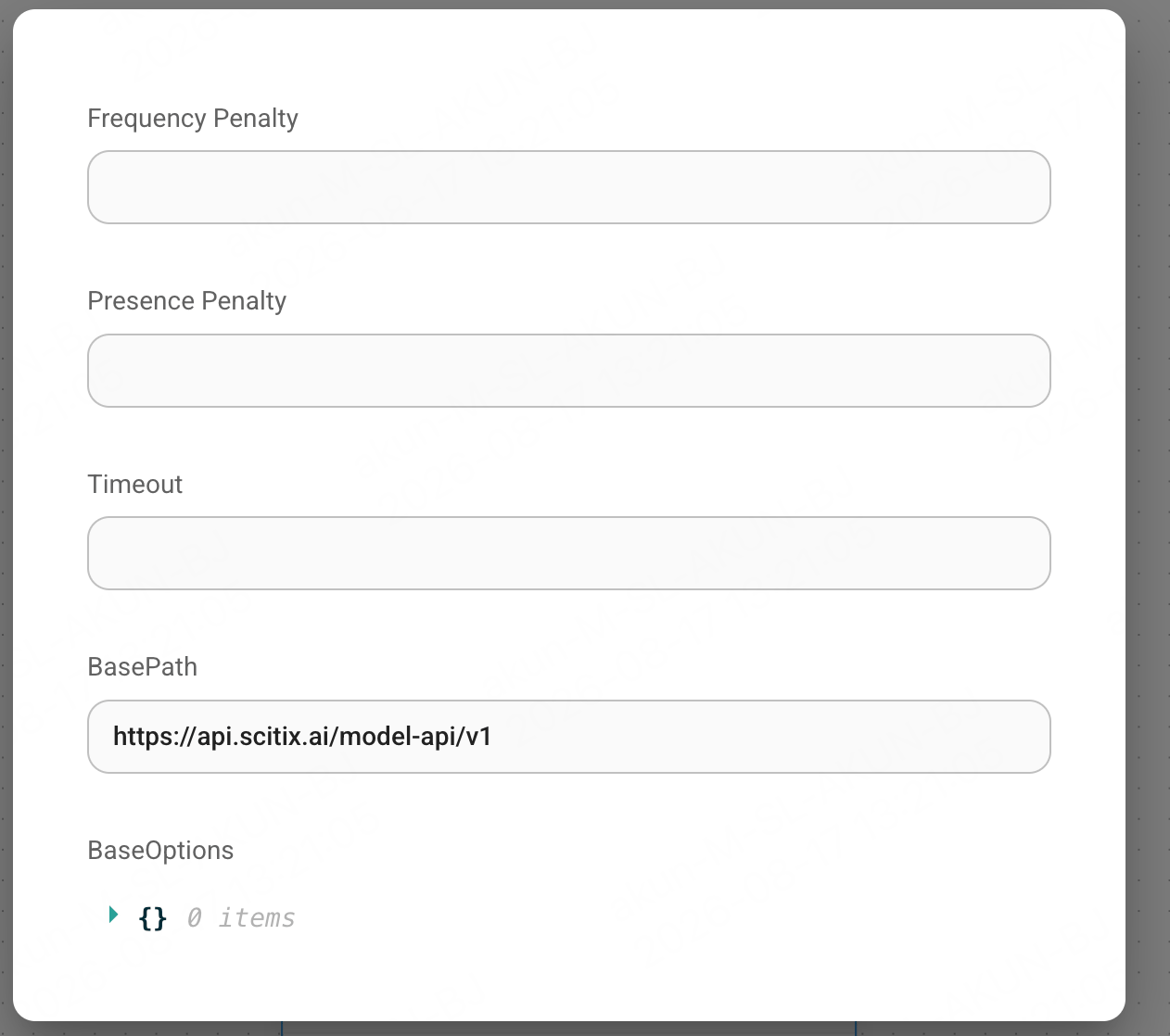
| BasePath (under **Additional Parameters**) | `https://api.scitix.ai/model-api/v1` |
Use the **ChatOpenAI Custom** node, not plain **ChatOpenAI**. It exposes the `BasePath` field and does not validate the model name against OpenAI's own list, which is what lets ScitiX IDs like `glm-5.2` through.
 ## Verify
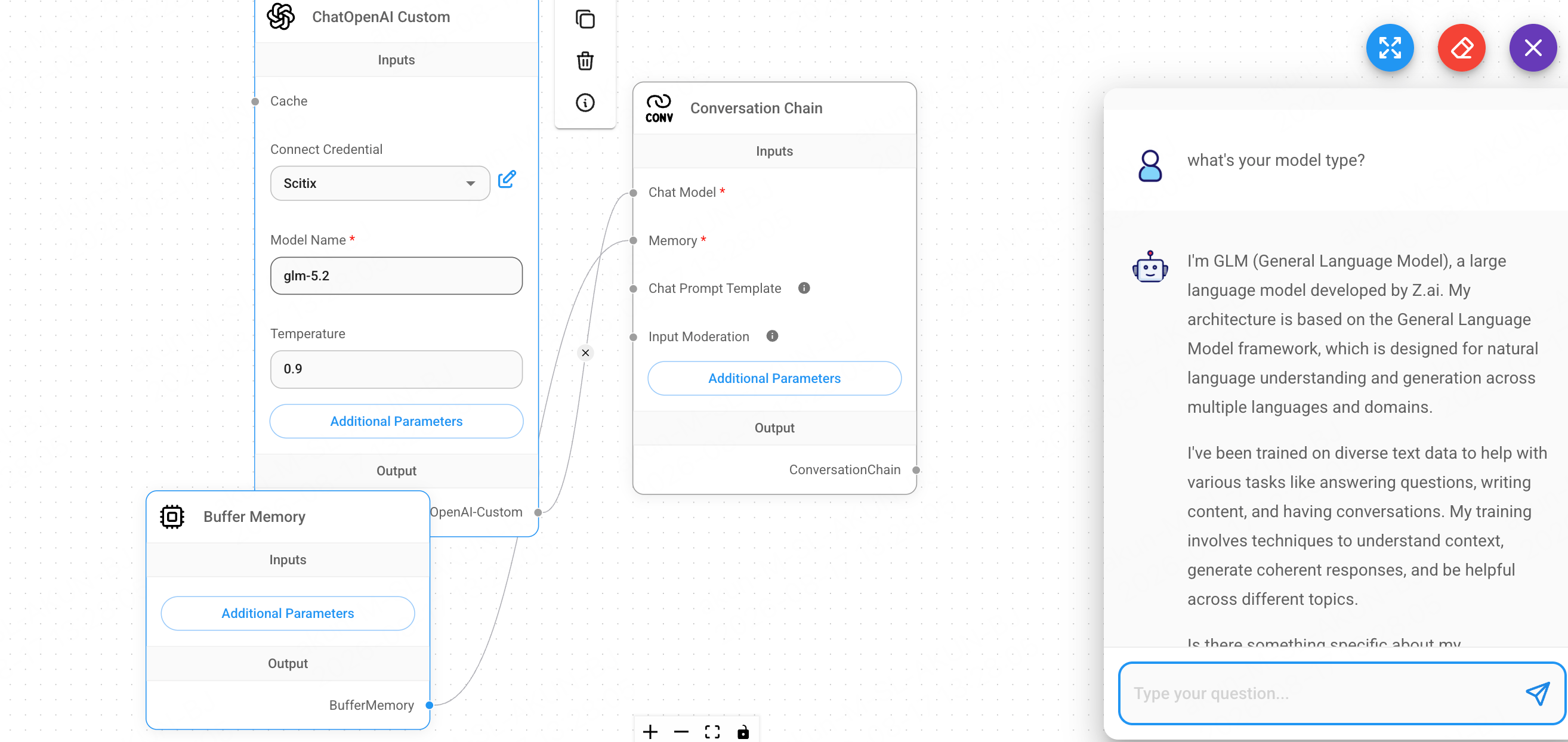
A Chatflow's **ending node must be a Chain / Agent / Engine**, not the model node itself. Add a **Conversation Chain**, wire the **ChatOpenAI Custom** node into its **Chat Model** input (add a **Buffer Memory** for the Memory input), then open the chat and send a message — a normal reply confirms the connection.
## Verify
A Chatflow's **ending node must be a Chain / Agent / Engine**, not the model node itself. Add a **Conversation Chain**, wire the **ChatOpenAI Custom** node into its **Chat Model** input (add a **Buffer Memory** for the Memory input), then open the chat and send a message — a normal reply confirms the connection.
 Feeding a bare ChatOpenAI node as the flow's endpoint raises *"Ending node must be either a Chain or Agent or Engine"* — connect it into a Conversation Chain or a Tool Agent for tool-calling flows instead.
Verified on Flowise 2.2.8.
Feeding a bare ChatOpenAI node as the flow's endpoint raises *"Ending node must be either a Chain or Agent or Engine"* — connect it into a Conversation Chain or a Tool Agent for tool-calling flows instead.
Verified on Flowise 2.2.8.