> ## Documentation Index
> Fetch the complete documentation index at: https://docs.scitix.ai/llms.txt
> Use this file to discover all available pages before exploring further.
# Cursor
[Cursor](https://cursor.com) is an AI IDE. Through its bring-your-own-key (BYOK) settings, you can configure an OpenAI API key and a Base URL override so Cursor chat can run on ScitiX models.
Two product boundaries from Cursor's own docs are important:
* Custom API keys only work with chat models. Tab completion and other features built on Cursor's own models continue using Cursor's built-in models.
* BYOK requests are sent through Cursor's backend to the configured endpoint, and Cursor's Zero Data Retention policy does not apply to BYOK usage.
## Configure
Create an API Key on the [API Keys](https://console.scitix.ai/model-inference/api_keys) page, then open **Cursor Settings → Models**.
1. In the model list, uncheck the pre-configured models.
Pre-configured models route through Cursor's own channels, not your key.
2. Click **Add Custom Model** and add `DeepSeek-V4-Flash`.
Do not add `glm-5.2` here. Cursor's built-in catalog already contains a *GLM 5.2* entry, so the duplicate name is rejected. The built-in entry uses Cursor's official channel, not your key. Pick ScitiX model IDs that do not collide with [Cursor's built-in list](https://cursor.com/docs/models), such as `DeepSeek-V4-Pro` or `DeepSeek-V4-Flash`.
3. Scroll to **API Keys → OpenAI API Key** and paste your ScitiX API Key.
4. Enable **Override OpenAI Base URL** and set it to:
```text theme={null}
https://api.scitix.ai/model-api/v1
```
5. Turn the **OpenAI API Key** toggle on.
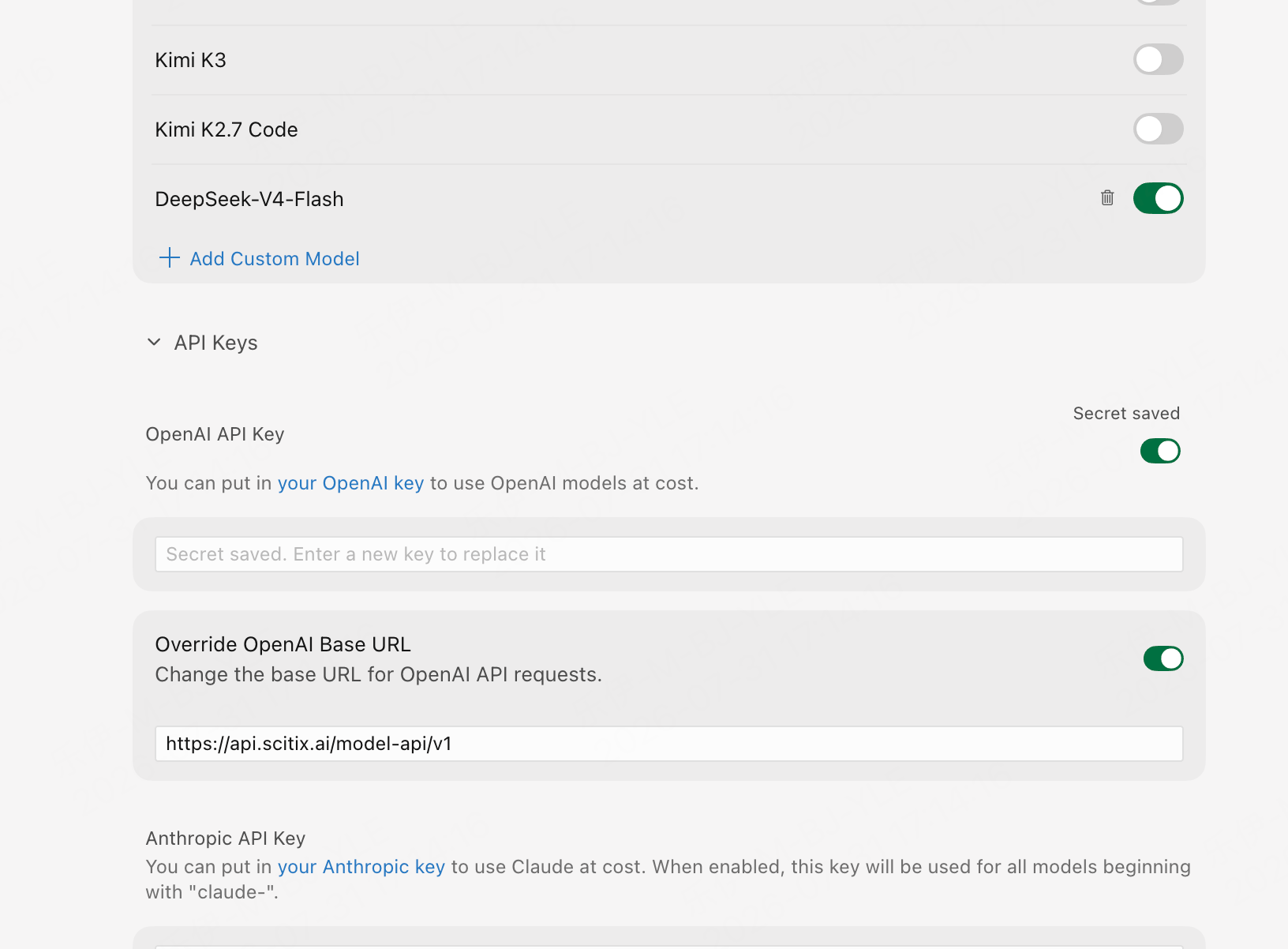 The Base URL override is no longer described in Cursor's official documentation, and its UI location may change between versions. As of late July 2026, it lives under **Cursor Settings → Models → API Keys**.
## Verify
Open Chat (`Cmd/Ctrl+L`), select the model you added in the picker, and send a message. A normal reply confirms that the connection works.
Since these model IDs only exist on ScitiX, a reply is proof that the override is in effect. You can also see the calls on the ScitiX console's usage page.
## FAQ
* **Selecting a built-in model gets no reply** when only your BYOK key is configured. Built-in entries, such as the catalog's GLM 5.2, do not route through the Base URL override. Use the models you added through **Add Custom Model**.
* Tab completion not working on ScitiX models is expected. It is a product limitation of custom keys, not a configuration error.
The Base URL override is no longer described in Cursor's official documentation, and its UI location may change between versions. As of late July 2026, it lives under **Cursor Settings → Models → API Keys**.
## Verify
Open Chat (`Cmd/Ctrl+L`), select the model you added in the picker, and send a message. A normal reply confirms that the connection works.
Since these model IDs only exist on ScitiX, a reply is proof that the override is in effect. You can also see the calls on the ScitiX console's usage page.
## FAQ
* **Selecting a built-in model gets no reply** when only your BYOK key is configured. Built-in entries, such as the catalog's GLM 5.2, do not route through the Base URL override. Use the models you added through **Add Custom Model**.
* Tab completion not working on ScitiX models is expected. It is a product limitation of custom keys, not a configuration error.