> ## Documentation Index
> Fetch the complete documentation index at: https://docs.scitix.ai/llms.txt
> Use this file to discover all available pages before exploring further.
# AnythingLLM
[AnythingLLM](https://github.com/Mintplex-Labs/anything-llm) is an all-in-one desktop and self-hosted AI application with workspaces, document chat (RAG), and agents. Its **Generic OpenAI** provider can connect to the ScitiX Model Inference API, so ScitiX models can power chat and agent workflows.
Supported models include `glm-5.2` and `DeepSeek-V4-Flash`. For model pricing, see the [model catalog](https://console.scitix.ai/model-inference/models).
## Configure
You can configure AnythingLLM through the onboarding UI, the settings page, or `server/.env` for a self-hosted deployment.
### 1. Configure the Generic OpenAI provider
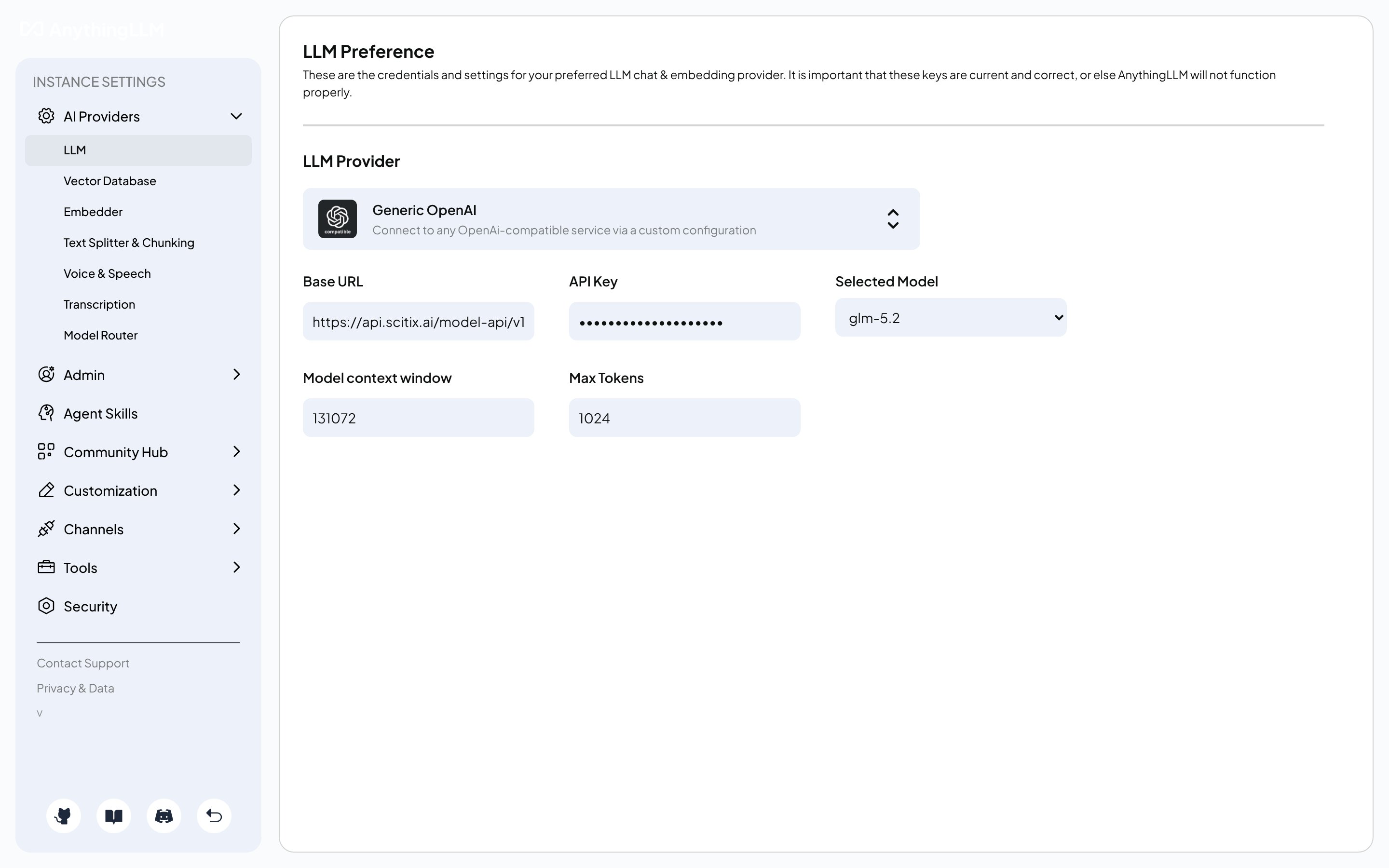
During onboarding, or later under **Settings → AI Providers → LLM**, choose **Generic OpenAI** as the LLM provider and fill in the required fields.
| Field | Value |
| -------------------- | ------------------------------------------------------------------------------------------------ |
| Base URL | `https://api.scitix.ai/model-api/v1` |
| API Key | Your API Key created on the [API Keys](https://console.scitix.ai/model-inference/api_keys) page. |
| Selected Model | `glm-5.2` |
| Model context window | `131072` |
When configuring workspace chat mode:
* When the workspace chat mode is left on its default and the model supports native tool calling, AnythingLLM routes to its agent flow.
* Set the workspace chat mode to **chat** for plain conversation, or keep the default for agent and tool use.
* Choose a model with native tool calling if you rely on agents or document-tool features. `glm-5.2` supports tool calling.
 ### 2. Configure `server/.env` for self-hosted deployments
For a self-hosted deployment, either bare-metal or Docker, set the same values in `server/.env`:
```bash theme={null}
LLM_PROVIDER="generic-openai"
GENERIC_OPEN_AI_BASE_PATH="https://api.scitix.ai/model-api/v1"
GENERIC_OPEN_AI_MODEL_PREF="glm-5.2"
GENERIC_OPEN_AI_MODEL_TOKEN_LIMIT=131072
GENERIC_OPEN_AI_API_KEY=""
```
Use `https://api.scitix.ai/model-api/v1` with `/v1`. AnythingLLM's Generic OpenAI provider passes this base path to the OpenAI SDK, which appends `/chat/completions`.
## Verify
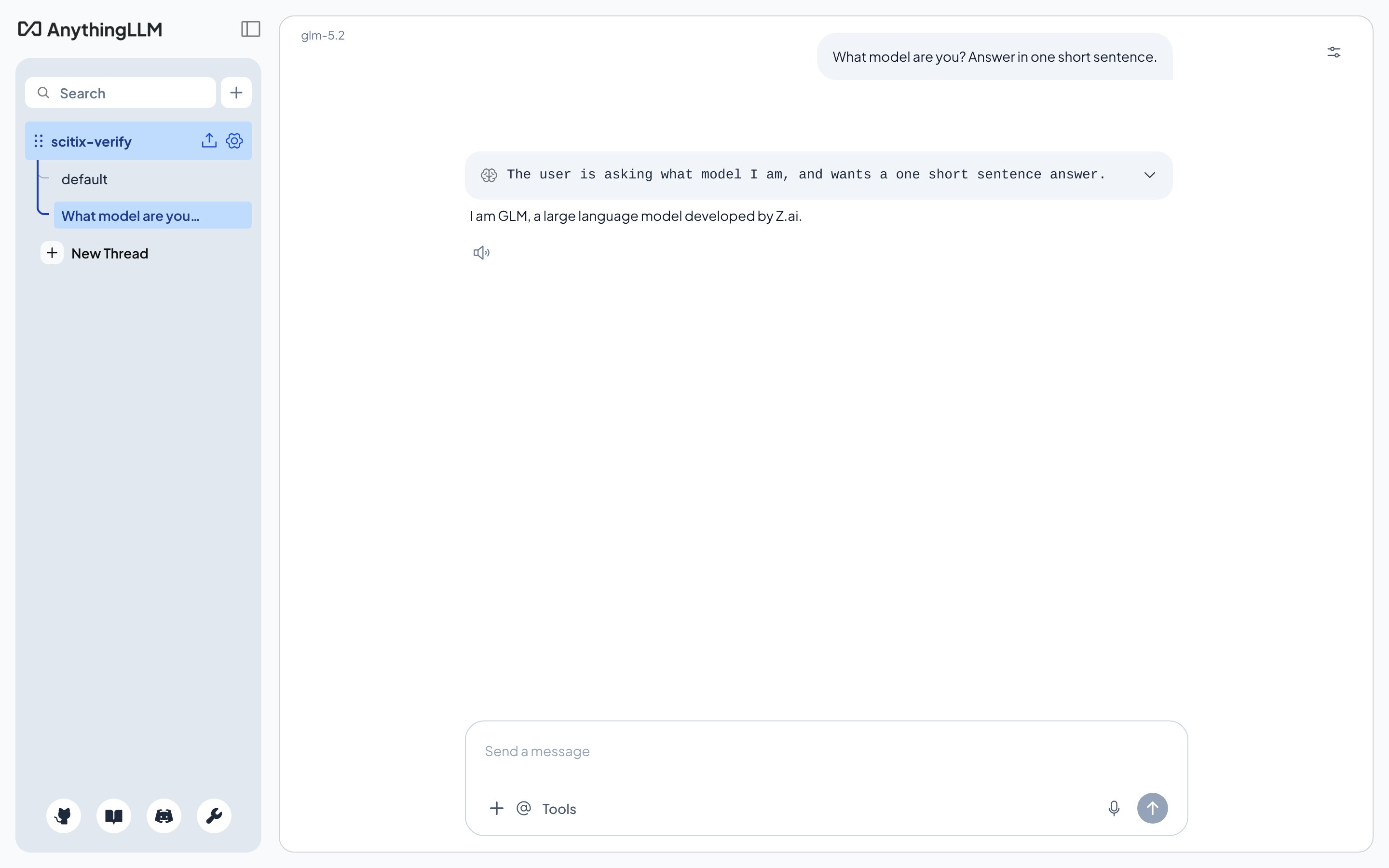
Create a workspace, confirm that the model shown at the top is your ScitiX model, and send a message. A normal reply confirms that the connection works.
### 2. Configure `server/.env` for self-hosted deployments
For a self-hosted deployment, either bare-metal or Docker, set the same values in `server/.env`:
```bash theme={null}
LLM_PROVIDER="generic-openai"
GENERIC_OPEN_AI_BASE_PATH="https://api.scitix.ai/model-api/v1"
GENERIC_OPEN_AI_MODEL_PREF="glm-5.2"
GENERIC_OPEN_AI_MODEL_TOKEN_LIMIT=131072
GENERIC_OPEN_AI_API_KEY=""
```
Use `https://api.scitix.ai/model-api/v1` with `/v1`. AnythingLLM's Generic OpenAI provider passes this base path to the OpenAI SDK, which appends `/chat/completions`.
## Verify
Create a workspace, confirm that the model shown at the top is your ScitiX model, and send a message. A normal reply confirms that the connection works.