> ## Documentation Index
> Fetch the complete documentation index at: https://docs.scitix.ai/llms.txt
> Use this file to discover all available pages before exploring further.
# Scale Up or Scale Down a GPFS File System
When a GPFS file system has insufficient capacity or is overprovisioned, you can adjust the file system capacity. If the target capacity is greater than the current capacity, the operation is a scale-up operation. If the target capacity is less than the current capacity, the operation is a scale-down operation.
## Usage notes
* Scale-up is suitable when file system capacity is insufficient, or when training, inference, or data processing jobs are expected to write more data.
GPFS file systems use thick provisioning. After scale-up is complete, the file system is metered based on the adjusted capacity.
* Scale-down is suitable when the file system is overprovisioned and the current data size is significantly lower than the target capacity.
Before you scale down a file system, check the current file system usage. We recommend that you delete or migrate data that is no longer needed and reserve sufficient capacity to avoid scale-down failures or future write issues when usage is close to the target capacity.
## Prerequisites
Before you adjust the capacity, make sure that:
* The file system is in the `Running` state.
* The target capacity meets the capacity range and scaling increment of the current storage type.
* You have evaluated the impact of the capacity adjustment on running jobs.
* If you need to scale down the file system, the current usage is lower than the target capacity and sufficient capacity is reserved.
If the current usage of the file system is greater than the scale-down target capacity, the scale-down operation fails.
## Procedure
1. Log on to the console and go to **GPFS**.
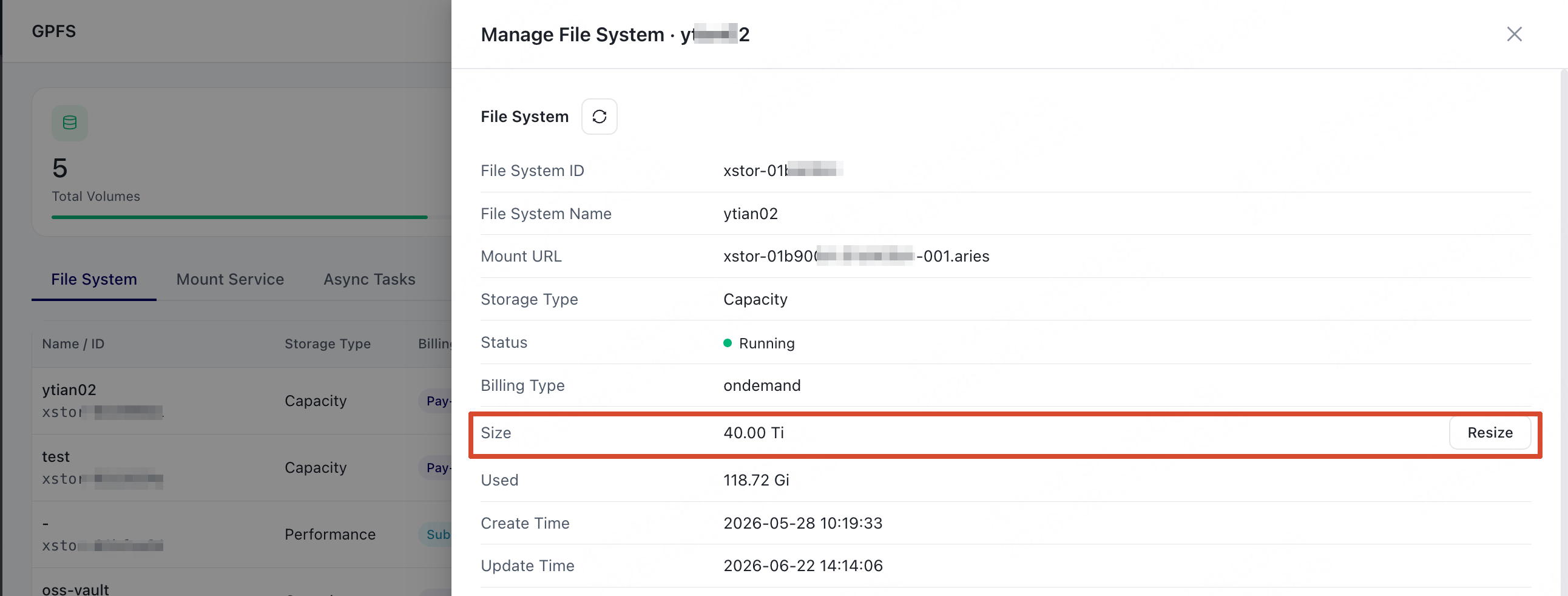
2. Find the file system whose capacity you want to adjust and choose **Manage**.
3. In the **Size** section of the panel, choose **Resize**.
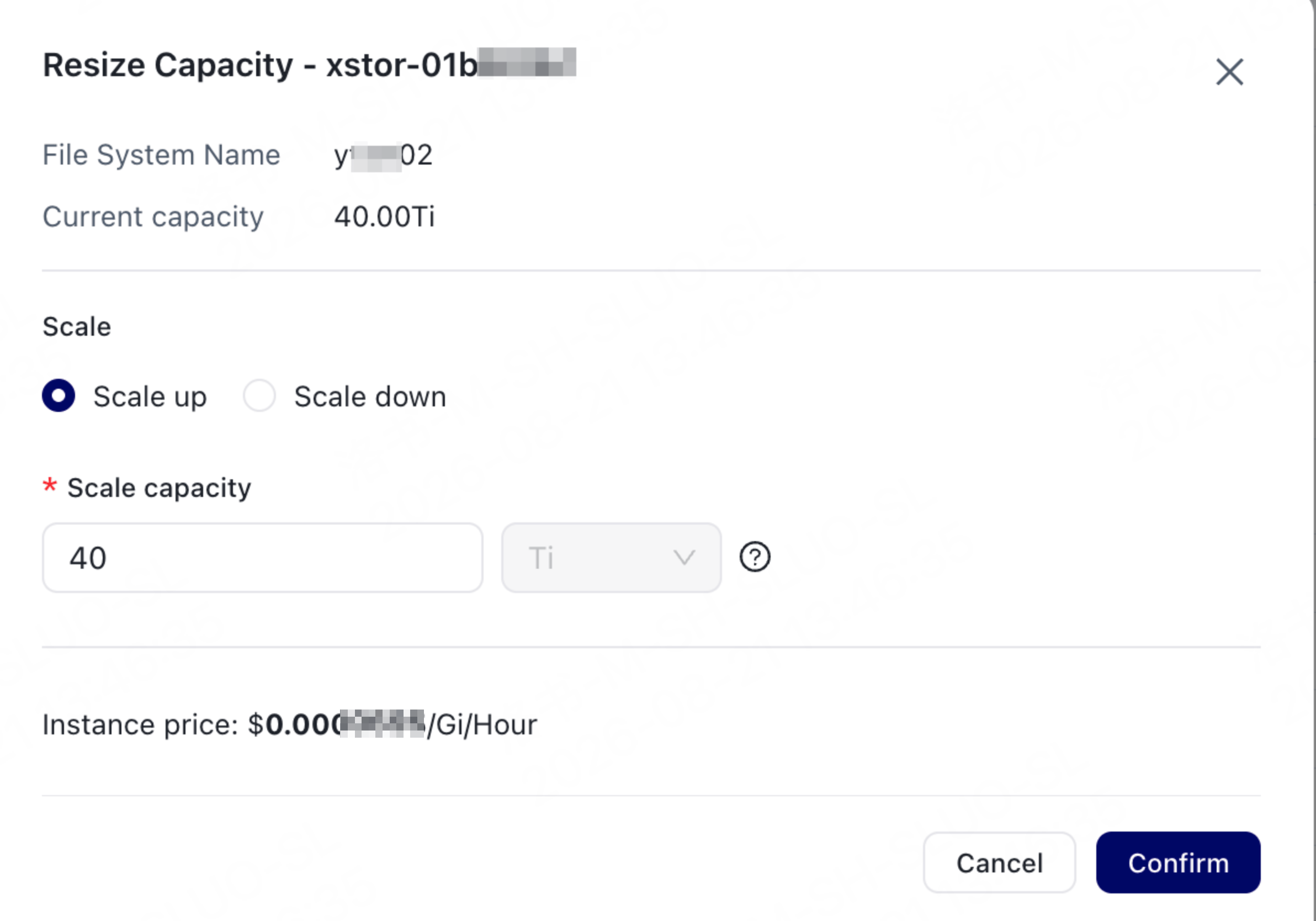
 4. Select **Scale up** or **Scale down**, and enter the capacity.
 | Parameter | Description |
| -------------- | --------------------------------------------------------------------------------------------------------------------------------------------------------------------------------------------------------------- |
| Operation type | Select **Scale up** or **Scale down**. Select **Scale up** when the target capacity is greater than the current capacity, and select **Scale down** when the target capacity is less than the current capacity. |
| Capacity | The target capacity of the file system after adjustment. The target capacity must meet the capacity range and scaling increment of the current storage type. |
5. Confirm the amount and choose **Confirm**.
6. Return to the file system list and check the adjustment result based on the status.
* Extending: The file system capacity is being adjusted. This status may be displayed for both scale-up and scale-down operations.
* Running: The capacity adjustment is complete.
* Failed: The capacity adjustment failed. Handle the issue based on the error message. If you cannot identify the cause, contact support.
Capacity adjustment is an asynchronous operation. Scale-up or scale-down operations usually take 2 to 10 minutes. A larger adjustment may require more time.
| Parameter | Description |
| -------------- | --------------------------------------------------------------------------------------------------------------------------------------------------------------------------------------------------------------- |
| Operation type | Select **Scale up** or **Scale down**. Select **Scale up** when the target capacity is greater than the current capacity, and select **Scale down** when the target capacity is less than the current capacity. |
| Capacity | The target capacity of the file system after adjustment. The target capacity must meet the capacity range and scaling increment of the current storage type. |
5. Confirm the amount and choose **Confirm**.
6. Return to the file system list and check the adjustment result based on the status.
* Extending: The file system capacity is being adjusted. This status may be displayed for both scale-up and scale-down operations.
* Running: The capacity adjustment is complete.
* Failed: The capacity adjustment failed. Handle the issue based on the error message. If you cannot identify the cause, contact support.
Capacity adjustment is an asynchronous operation. Scale-up or scale-down operations usually take 2 to 10 minutes. A larger adjustment may require more time.