> ## Documentation Index
> Fetch the complete documentation index at: https://docs.scitix.ai/llms.txt
> Use this file to discover all available pages before exploring further.

# Modify Instance File Storage

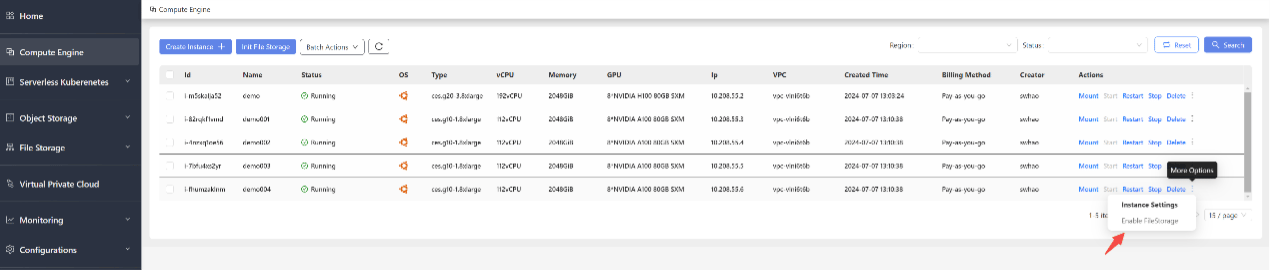
1. Go to the Compute Engine management page.
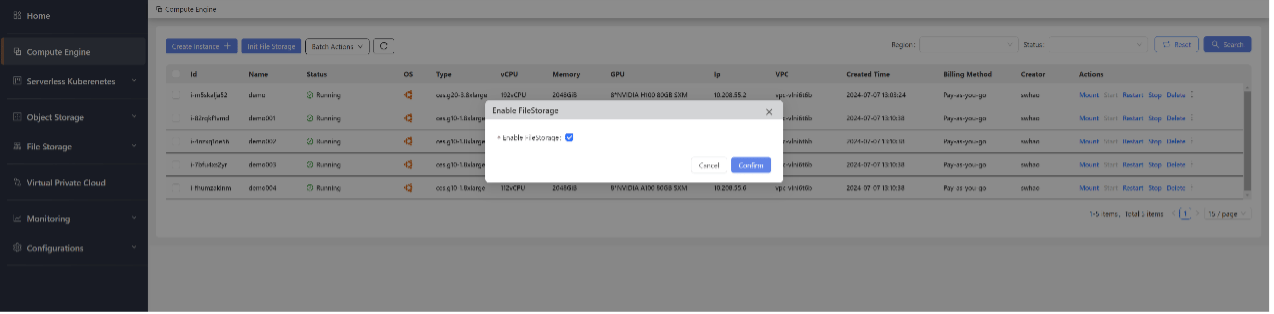
2. On the right side of the CES instance for which you want to modify file storage, click the More Operations button and then click Enable FileStorage to enable or disable file storage mounting, as shown below:
<img src="https://mintcdn.com/scitix-adfc65c2/zz3UuyM3SCvVbeP9/gpu-cloud/instance/media/modify-procedure1.png?fit=max&auto=format&n=zz3UuyM3SCvVbeP9&q=85&s=e44753c6cb5d2f792377b09a3a4fbdff" alt="Procedure" width="1274" height="275" data-path="gpu-cloud/instance/media/modify-procedure1.png" />

<img src="https://mintcdn.com/scitix-adfc65c2/zz3UuyM3SCvVbeP9/gpu-cloud/instance/media/modify-procedure2.png?fit=max&auto=format&n=zz3UuyM3SCvVbeP9&q=85&s=c79e1792aee3a3c769d13e160f645a5e" alt="Procedure2" width="1274" height="314" data-path="gpu-cloud/instance/media/modify-procedure2.png" />
