> ## Documentation Index
> Fetch the complete documentation index at: https://docs.scitix.ai/llms.txt
> Use this file to discover all available pages before exploring further.
# View Instances
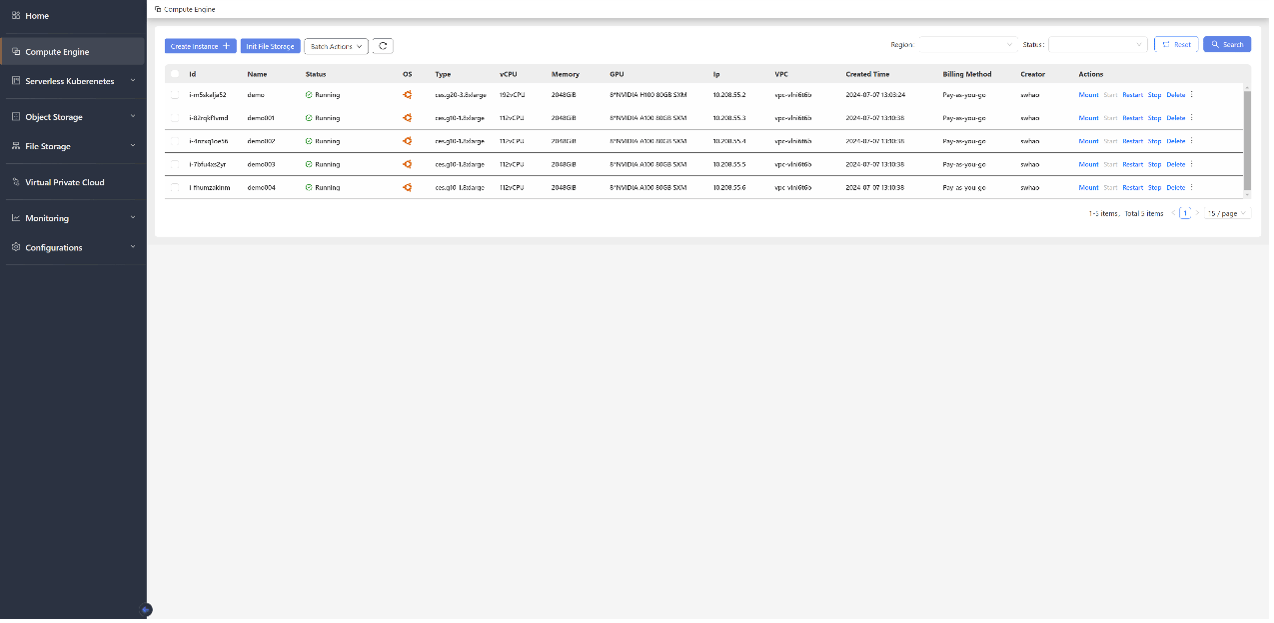
1. Go to the Compute Engine management page.
2. The instance summary table displays the following fields:
| **Stats** | Instructions | Example |
| ------------------ | ------------------------------------------------------------------ | ---------------------------- |
| **Instance Id** | Unique Instance ID | i-m5skalja52 |
| **Name** | Instance Name, which is also the hostname during OS initialization | demo |
| **Status** | Instance Running Status | Creating\|Running\|Stopped |
| **OS** | Operating System Type | Ubuntu、CentOS |
| **Instance Type** | Instance Type | ces.g20-3.8xlarge |
| **vCPU** | Instance CPU Logical Core Resources | 192vCPU |
| **Memory** | Instance Memory Resources | 2048GiB |
| **GPU** | Instance GPU Card Resources | 8\*NVIDIA H100 80GB SXM |
| **IP** | Instance IP Address | 10.208.55.2 |
| **VPC** | VPC Network ID of the Instance | vpc-vlni6t6b |
| **Created Time** | Instance Creation Time | 2024-07-07 13:03:24 |
| **Billing Method** | Instance Payment Type | Subscription\|Pay-as-you-go |
| **Creator** | Instance Creator | swhao |
| **Actions** | Supported Instance Operation Types | Start\|Restart\|Stop\|Delete |
As shown in the figure:
 ## Instance types and performance
| product type | instance name | spec |
| --------------- | ------------------ | ------------------------------------------------------------------------------------------------------------------------------------------------------------------------- |
| CES(Bare Metal) | ces.g11-7.8xlarge | CPU:Intel 8358(2.6Ghz, 32 Core)\* 2
## Instance types and performance
| product type | instance name | spec |
| --------------- | ------------------ | ------------------------------------------------------------------------------------------------------------------------------------------------------------------------- |
| CES(Bare Metal) | ces.g11-7.8xlarge | CPU:Intel 8358(2.6Ghz, 32 Core)\* 2
MEM:2TB
Disk:2\*960GB (raid 1)
GPU:8\*NVIDIA A100-pcie-80G
Network:25Gbps\*2RDMA: 2\*200Gbps |
| | ces.g20-3.8xlarge | CPU: Intel 8468(2.1Ghz, 48Core) \* 2
MEM: 2T
Disk: 960G \*2 (raid 1)
GPU: H100-nvlink-80G\*8
Network: 25Gbps\*2 RDMA: NDR 400Gbps \* 4 |
| | ces.g21-3.8xlarge | CPU:Intel 8558P(48C 2.7GHz)\*2
MEM: 64G DDR5\*32 DISK: SSD960G\*2(raid1) DISK:3.84T NVMe SSD *4 GPU: H200\_nvlink-141G \*8 NEWWORK: 25Gbps*2RDMA: NDR 400Gbps \* 8 |
| | ces.c23-2 | CPU:Intel 6430(2.1Ghz,32 Core) \* 2
MEM: 64G DDR5\*32
DISK: SSD960G\*2(raid1)
Network: 25Gbps\*2RDMA: HDR 200Gbps \* 2 |
| | ces.g14-2.8xlarge | CPU:Intel 8358(2.6Ghz, 32 Core)\* 2
MEM:2TB
Disk:2\*960GB (raid 1)
GPU:NVIDIA A100-nvlink-80G \* 8
NetWork:25Gbps\*2RDMA: HDR 200Gbps \* 2 |
| VIM Instance | ces.vc23-2.2xlarge | 8 vCPU, 128G Memory, 200G Disk |
| | ces.vc23-2.4xlarge | 16 CPU, 256G Memory, 200G Disk |
| | ces.vc23-2.8xlarge | 32 CPU, 512G Memory, 200G Disk |
| | | |
## CPU Benchmark
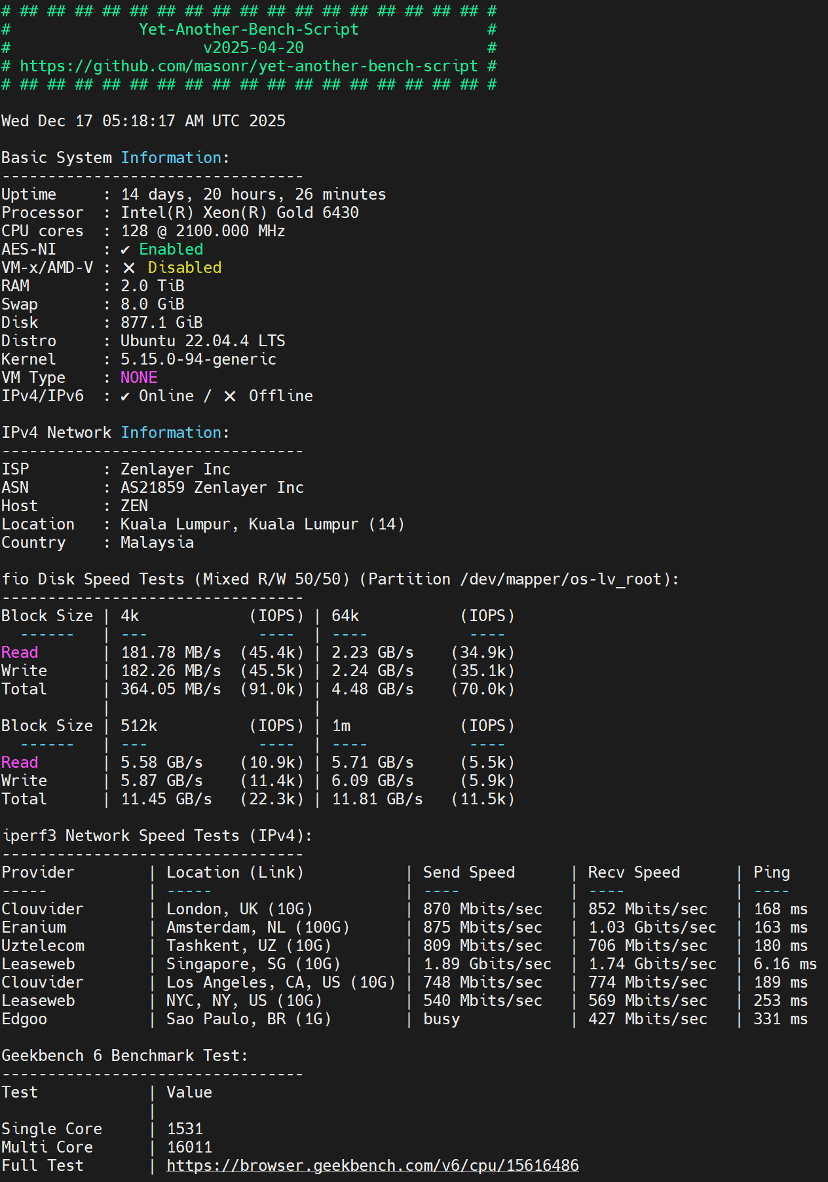
* CPU bare metal: ces.c23-2
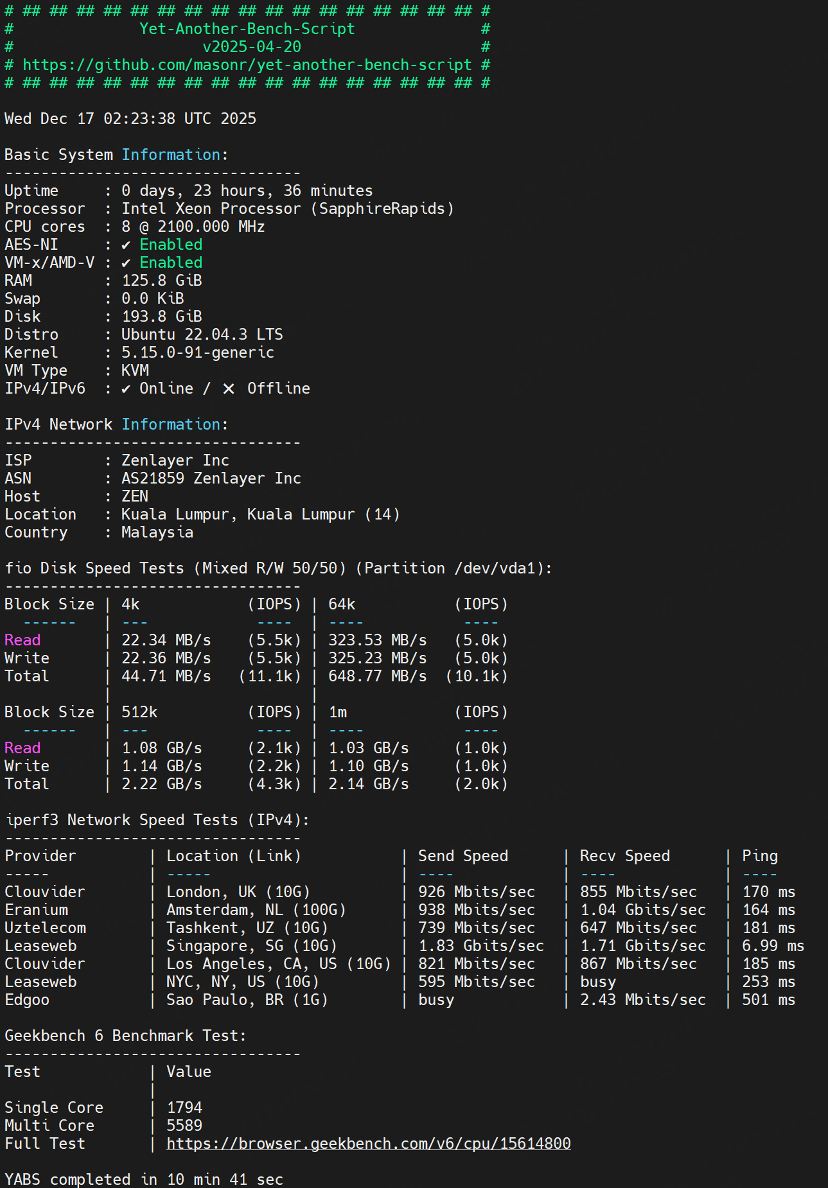
 * VM Instance: taking the instance ces.vc23-2.2xlarge as an example, the system benchmark test is as follows。
* Other types of instances will only differ in terms of the number of CPU cores and the size of memory.
* VM Instance: taking the instance ces.vc23-2.2xlarge as an example, the system benchmark test is as follows。
* Other types of instances will only differ in terms of the number of CPU cores and the size of memory.
 * What are the diferences between bare metal and vm instances?
| features | vm | bare mental |
| --------------------------------------- | -- | ----------- |
| ssd disk | no | yes |
| rdma network | no | yes |
| whether hyper-threading can be disabled | no | yes |
* What are the diferences between bare metal and vm instances?
| features | vm | bare mental |
| --------------------------------------- | -- | ----------- |
| ssd disk | no | yes |
| rdma network | no | yes |
| whether hyper-threading can be disabled | no | yes |