> ## Documentation Index
> Fetch the complete documentation index at: https://docs.scitix.ai/llms.txt
> Use this file to discover all available pages before exploring further.

# Mount a Volume

## Steps

1. You can use kubeconfig to check the binding status of the PVC. If the STATUS is BOUND, it means the Volume has been successfully created. Example:

   <img src="https://mintcdn.com/scitix-adfc65c2/zz3UuyM3SCvVbeP9/gpu-cloud/cluster/media/mount-volume.png?fit=max&auto=format&n=zz3UuyM3SCvVbeP9&q=85&s=90c129d3568168b869cd6a69aab8b789" alt="Mount1" width="832" height="74" data-path="gpu-cloud/cluster/media/mount-volume.png" />

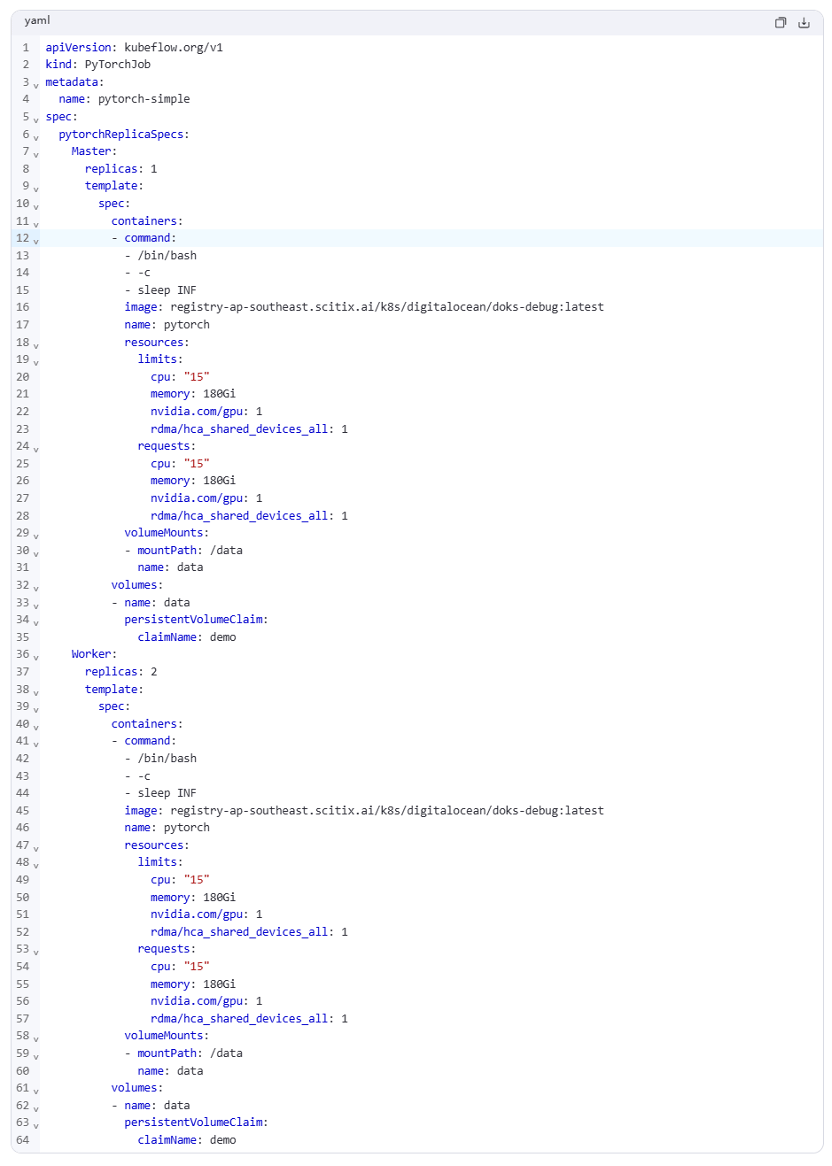
2. Mount the PVC to the Pod and use the created volume. Example:
   <img src="https://mintcdn.com/scitix-adfc65c2/zz3UuyM3SCvVbeP9/gpu-cloud/cluster/media/mount-volume2.png?fit=max&auto=format&n=zz3UuyM3SCvVbeP9&q=85&s=6b3cab432432f6bd39a9d5505f12cdad" alt="Mount2" width="832" height="1166" data-path="gpu-cloud/cluster/media/mount-volume2.png" />
